Emerson JMK2442 Bruksanvisning
Emerson Inte kategoriserad JMK2442
Läs gratis den bruksanvisning för Emerson JMK2442 (4 sidor) i kategorin Inte kategoriserad. Guiden har ansetts hjälpsam av 23 personer och har ett genomsnittsbetyg på 4.3 stjärnor baserat på 6 recensioner. Har du en fråga om Emerson JMK2442 eller vill du ställa frågor till andra användare av produkten? Ställ en fråga
Sida 1/4
1
This Emerson Research model JMK2442 security timer allows you to program a lamp in your house to turn on and off automatically to
create the impression that the house is occupied even when no one is at home. You can program up to 4 different ‘On’ and ‘Off’times
within 24 hours, and you can select from among the following operation options:
Every Day, Monday thru Saturday, , Weekdays OnlyWeekends Only, or any individual day.
In addition you can select Random operation to vary the programmed On and Off times by up to 75 minutes, rather than have the lights
turn On and Off at exactly the same time each day.
The timer also includes a second “untimed” AC outlet, not controlled by the timer. This means that if you currently have two devices
plugged in to your AC outlet you do not ‘lose’ the use of one of the outlets when you connect this timer. Simply plug the other device that
does not require timer control into the “untimed” outlet.
Because this timer uses Emerson’s patented SmartSet
®
auto time setting technology it will automatically reset itself after any power
interruption, and Daylight Saving Time adjustments are made automatically through the year 2099.
SmartSet
2
3
4
5
6
7
8
9
10
12
1
13
11
Model:J2442MK
SSmtaret
®
LampCoontrlSuecrityTimer
R
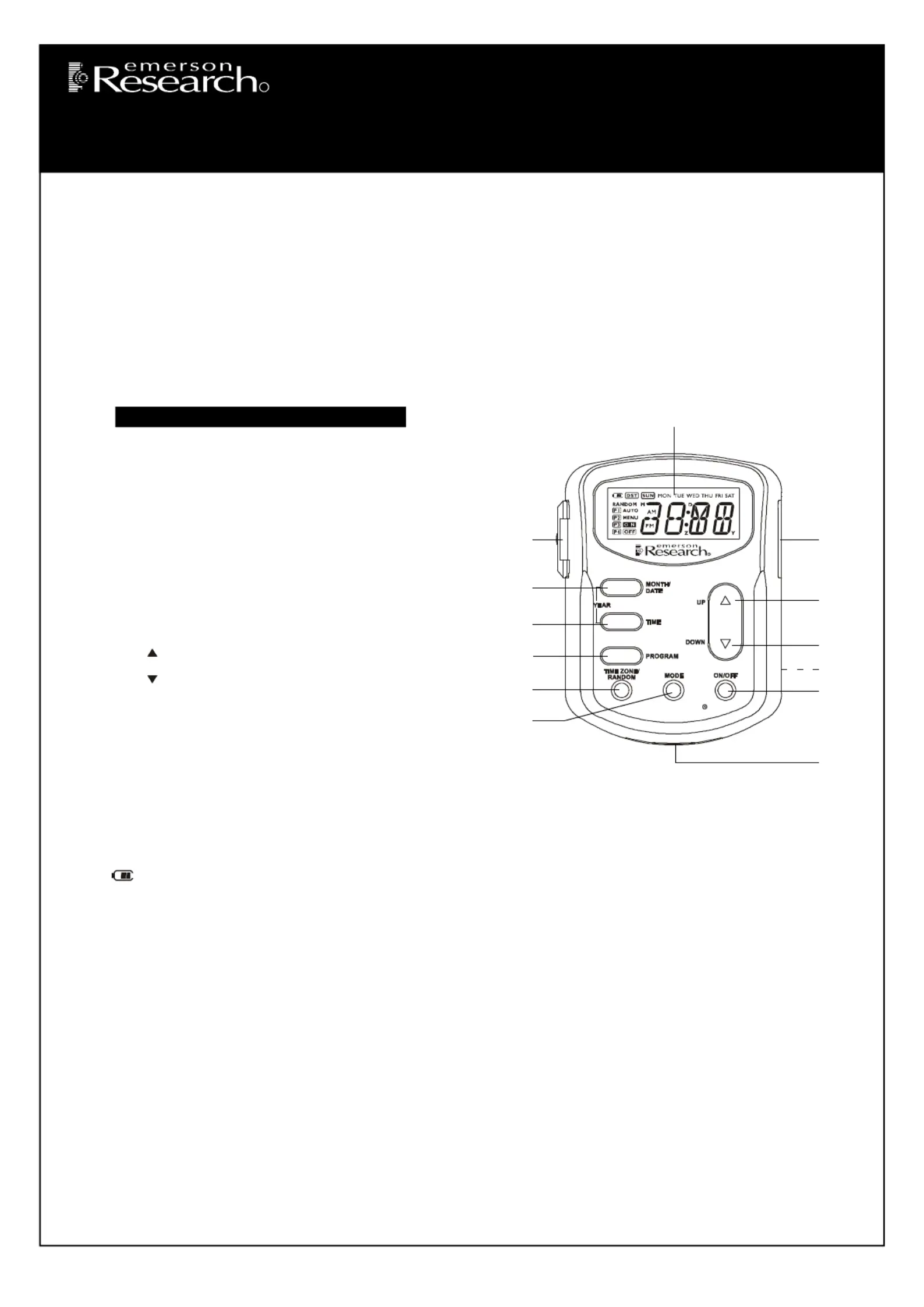
1.)MODE Button.
2.)TIME ZONE/RANDOM Button.
3.)PROGRAM Button.
4.)TIME Button.
5.)MONTH/DATE Button.
6.)EXTRA UNTIMED OUTLET With Cover.
7.)Multi-Function LCD Display.
8.)TIMED OUTLET.
9.) UPButton.
10.) DOWN Button.
11.)RESETButton (On Back Cabinet).
12.)ON/OFFButton.
13.)Lithium Battery Compartment.
Loonoonondndocati f Ctrlsa Iicatrs
Iiilnta Set Up
Baeyattr Inofrmtion
Theonge3 l lif V lithubaeim ttry (Tyspe CR2032) i penaednher-istll i t timer. Theer is noneedon t istaanbaell y ttry atthistimeheogna. T riil
baehoudpodebattrys l rvi ck uppoeobeeen3and5eaaanuheneoepaehebaeaLoae wr fr tw yrs t miimm. W iiit s tm t rlc t ttry w Bttry
iiillilndcaotr w begn fassyhngnhedi i t ipal.ftt Reer o he “Repalcy”ingheae T Bttr scetionintheesiinustrctons.
DBilspaya nd ackaliiIghtng nofrmtion
Baeyettr Powr
When tthe imer is noonneedt cct tothe AC ouetlt, thebunilit baettry willpowehedpr t islay. Prengssi any oneo ft heon ctrol buontts will tunr
the dpaisly ‘On’. This aollws youo t pogrram the timer anda mkea ll neecssyar adujsttmens wheil hodling the timer in your hand. Thed ilspay
will tunr ‘Off’ agani60scseondaeftrthelasct ononputrli t.
Not:eThedpabaghngdoenooeonunheeonneedoheoue isly ckliti s t cm ttil timr isc ct t t AC tlt.
AC Power
When tthe imer iscc onneted to your AC ouehedpatltt isly remanis ‘On’ csontantly. Prenganoneoheonossi y ft ctrl buontts will tunonr the
dpaisly backliightng fo10r scseond. Afte10r seondcs withnoon ctronpuheli tt dpaisly backliightnggoe s‘Off’ auoatmtically, butt hedp islay
reanmis‘On’.
SeeeeecettingTh Tim FoThr Corrt Zon
The fttirs imeha tt youpean rss y buononhett t timehedpr t islillay w tunr‘On’ andshoheoew t crrct timenhe i t Eastenr Time zonea. Estenr
Timehen is t iiitadeauengl flt stti.If Daghylit Sangvi Tiiime s n eehendffct,t DST iicaoappeantr will r i thedpa isly.If thend DST iicsaodoetr
noappeanhedpat r i t isly,tt he imedpaeda isly is Esttenr Sandadr Time.
Ift yvou lien i hea Estenr Tiiillillmeonehee z,t r s nohtnge sceodohe t . T ock s arrreadeoys t cecty.Iffftt yvou lienad i ieenr imeoneou z y
mmuehesst tt tier foouononear yr w z ss foollw:
Vwwwwiits our eeab sit t ..eeamrrsondoicom
Produktspecifikationer
| Varumärke: | Emerson |
| Kategori: | Inte kategoriserad |
| Modell: | JMK2442 |
Behöver du hjälp?
Om du behöver hjälp med Emerson JMK2442 ställ en fråga nedan och andra användare kommer att svara dig
Inte kategoriserad Emerson Manualer

3 Mars 2025
26 Februari 2025
28 December 2024
28 December 2024
28 December 2024
11 December 2024
11 December 2024
11 December 2024
24 September 2024
24 September 2024
Inte kategoriserad Manualer
Nyaste Inte kategoriserad Manualer
9 April 2025
9 April 2025
9 April 2025
9 April 2025
9 April 2025
9 April 2025
9 April 2025
9 April 2025
9 April 2025
9 April 2025