Epson ET-2720 Bruksanvisning
Epson ej kategoriserat ET-2720
Läs gratis den bruksanvisning för Epson ET-2720 (4 sidor) i kategorin ej kategoriserat. Guiden har ansetts hjälpsam av 28 personer och har ett genomsnittsbetyg på 4.7 stjärnor baserat på 6 recensioner. Har du en fråga om Epson ET-2720 eller vill du ställa frågor till andra användare av produkten? Ställ en fråga
Sida 1/4
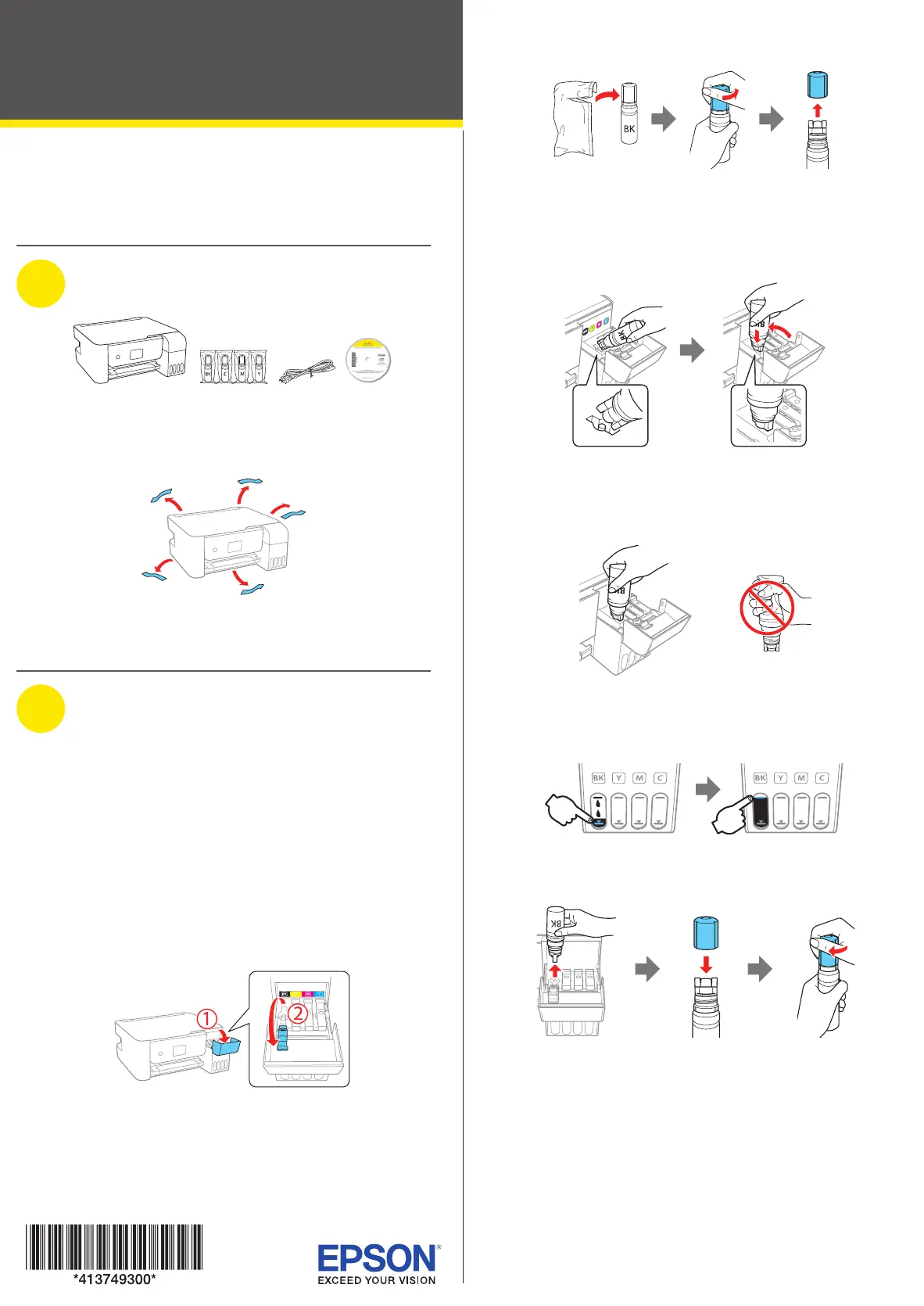
Start Here
IMPORTANT: Before using this product, make sure you read
these instructions and the safety instructions in the online
User’s Guide.
1
Unpack
Note: Do not open the ink bottles until you are ready to fill the ink
tanks. The ink bottles are vacuum packed to maintain reliability.
Remove all protective materials from the product.
Note: Do not turn on the product yet.
2
Fill ink tanks
Warning: Keep the ink bottles out of the reach of children and do not
drink the ink.
Caution: This product requires careful handling of ink. If ink spills,
wipe it off immediately with a damp towel to avoid permanent stains. If
ink gets on your clothes or belongings, it may not come off.
Note:
• Epson cannot guarantee the quality or reliability of non-genuine ink.
• Use the ink bottles included with the printer to set up the product.
Part of the ink will be used to charge the print head. These bottles
may print fewer pages compared with replacement ink bottles.
1 Open the ink tank cover and the cap for the black ink
tank.
Note: Refer to the color-coded sticker on the ink tank unit to
identify the color of each tank.
2 Unpack the black (BK) ink bottle. Hold the ink bottle
upright and slowly turn the bottle cap to remove it.
Caution: Do not shake or squeeze the ink bottle. Do not touch
the top of the ink bottle after its cap is removed.
3 Place the top of the ink bottle on the filling port, then
slowly stand the bottle upright to insert it, as shown.
Note: Do not force the bottles into position; they are keyed for
each color.
4 Wait for the ink to fill the tank. Do not squeeze the bottle.
Note: Ink flows into the tank and stops automatically when the
ink tank is filled to the upper line. If ink does not flow from the
bottle, lift and reinsert the bottle.
5 When the ink tank is full, remove the ink bottle and
securely close it with the bottle cap.
Note: Do not leave the ink bottle inserted; otherwise the bottle
may be damaged or ink may leak. If any ink remains in the bottle,
store the bottle upright and top off the ink tank after completing
initial setup.
ET-2720
Produktspecifikationer
| Varumärke: | Epson |
| Kategori: | ej kategoriserat |
| Modell: | ET-2720 |
| Inbyggd display: | Ja |
| Vikt: | 4000 g |
| Bredd: | 375 mm |
| Djup: | 347 mm |
| Höjd: | 179 mm |
| Förpackningens bredd: | 420 mm |
| Skärm diagonal: | 1.5 " |
| Wi-Fi: | Ja |
| Maximal upplösning: | 5760 x 1440 DPI |
| Ursprungsland: | Filippinerna |
| Internminne: | - MB |
| Antal användare: | 2 användare (er) |
| Snabbinstallationsguide: | Ja |
| Maximal kopieringsupplösning: | - DPI |
| Fax: | Nej |
| Mobil utskriftsteknik: | Epson Connect, Epson iPrint, Epson Email Print, Epson Remote Print, Apple AirPrint |
| Totalt antal inmatningsfack: | 1 |
| Pappersfackets mediavikt: | 64 - 300 g/m ^ |
| Serveroperativsystem som stöds: | Windows Server 2008 R2, Windows Server 2012 R2, Windows Server 2016 |
| Utskriftsmetod: | Epson Micro Piezo |
| Produktens färg: | Svart |
| bruksanvisning: | Ja |
| Låddjup: | 450 mm |
| Vikt inkl. förpackning: | 5820 g |
| Antal per förpackning: | 1 styck |
| Produkter per lastpall: | 35 styck |
| Produkter per lastpallslager: | 6 styck |
| Lastpallens bruttovikt: | 0 g |
| Inbyggd kortläsare: | Nej |
| Windows-operativsystem som stöds: | Windows 10, Windows 7, Windows 8, Windows 8.1, Windows Vista, Windows XP |
| Mac-operativsystem som stöds: | Mac OS X 10.6 Snow Leopard |
| Utskrift: | Färgutskrift |
| Dubbelsidig utskrift: | Ja |
| AC-inspänning: | 100 - 240 V |
| Kryptering/säkerhet: | 64-bit WEP, 128-bit WEP, WPA-PSK, WPA-TKIP, WPA2-PSK, WPA2-AES |
| Kabel inkluderad: | AC |
| Växelström Frekvens: | 50 - 60 hz |
| Bildkomprimeringsformat: | BMP, JPEG, PICT, TIFF, PNG |
| Strömkabel ingår: | Ja |
| Displaytyp: | LCD |
| Färgdisplay: | Ja |
| Ljudnivå Lc IEC: | 51 dB |
| USB-port: | Ja |
| Garantisedel: | Ja |
| Strömförbrukning i avslaget läge: | 0.2 W |
| Positionering på marknaden: | Hem och kontor |
| Strömförbrukning i väntläge: | 0.7 W |
| Direktutskrift: | Ja |
| Dokument som stöds: | |
| Utskriftsteknologi: | Bläckstråleskrivare |
| Utskriftshastighet (Svart, normalkvalitet, A4/US Brev): | 33 ppm |
| Utskriftshastighet (färg, normal kvalitet, A4/US Letter): | 15 ppm |
| Tid för första utskrift (svart): | 10 s |
| Tid för första utskrift (färg): | 16 s |
| Dubbelsidigt utskriftsläge: | Manuell |
| Driftcykel per månad: | - sidor per månad |
| Total inmatningskapacitet: | 100 ark |
| Total utmatningskapacitet: | 30 ark |
| Högsta ISO A-seriestorlek: | A4 |
| Pappersfackets typ av media: | Glossy paper, Photo paper, Plain paper |
| ISO A-serie storlek (A0...A9): | A4, A5, A6 |
| Icke-ISO utskriftsmaterial av olika storlek: | Executive (184 x 267mm), Legal (media size), Letter (media size) |
| ISO B-seriestorlekar (B0 ... B9): | B5, B6 |
| Optisk skanningsupplösning: | 1200 x 2400 DPI |
| Skanning: | Färgscanning |
| Ljudtrycksnivå (utskrivning): | 51 dB |
| Storlek på kantfri utskriftsmedia: | 10x15 |
| Kuvertstorlek: | 10, C6, DL |
| Strömförbrukning (genomsnittligt operativt): | - W |
| Skanningsteknik: | CIS |
| Skrivarfäger: | Svart |
| Foto-pappersstorlekar: | 10x15, 13x18 cm |
| Patron (er) som ingår: | Ja |
| Kantfri utskrift: | Ja |
| Bläckdroppe: | 3 |
| Lastpallsvikt (UK): | 0 g |
| Produkter per lastpallslager (UK): | 8 styck |
| Skrivhuvudmunstycken: | 180 nozzles black, 59 nozzles per colour |
| Ljudeffektsnivå (utskrift): | 6.3 dB |
| Kapacitet för inkluderad patron (CMY): | 6500 sidor |
| Kapacitet för inkluderad patron (svart): | 3600 sidor |
| Utskrivningshastighet (ISO/IEC 24734) färg: | 5 ppm |
| Utskrivningshastighet (ISO/IEC 24734) svart: | 10 ppm |
| Strömförbrukning (driftläge): | 4.3 W |
| Medelströmförbrukning vid kopiering: | 12 W |
| Produkter per lastpall (UK): | 50 styck |
Behöver du hjälp?
Om du behöver hjälp med Epson ET-2720 ställ en fråga nedan och andra användare kommer att svara dig
ej kategoriserat Epson Manualer

7 Oktober 2025
6 Oktober 2025
21 September 2025
20 September 2025
20 September 2025
18 September 2025
Epson WorkForce Feed Roller Assembly Kit B12B813561 Bruksanvisning
6 September 2025 14 Augusti 2025
14 Augusti 2025
14 Augusti 2025
ej kategoriserat Manualer
Nyaste ej kategoriserat Manualer
3 April 2026
3 April 2026
3 April 2026
3 April 2026
3 April 2026
3 April 2026
3 April 2026
3 April 2026
3 April 2026