Rocstor PrivacyView Framed Bruksanvisning
Rocstor ej kategoriserat PrivacyView Framed
Läs gratis den bruksanvisning för Rocstor PrivacyView Framed (1 sidor) i kategorin ej kategoriserat. Guiden har ansetts hjälpsam av 10 personer och har ett genomsnittsbetyg på 4.7 stjärnor baserat på 8 recensioner. Har du en fråga om Rocstor PrivacyView Framed eller vill du ställa frågor till andra användare av produkten? Ställ en fråga
Sida 1/1
Technical Support
United States
1 818 727 7000
www.rocstor.com/lters
Congratulations!
On your new Premium PrivacyView™ Framed Black Privacy Filter.
Limited Two Year Warranty
Rocstor warrants this product against defects in Material and workmanship
for Two year. Rocstor will supply, at its option, comparable new and rebuilt
replacements for defective parts and will pay the labor charges to repair the
product found to be defective. The dated bill of sale as evidence of the original
purchase price along with the defective product is required.
PrivacyView™ Premium Framed
Black Privacy Filter for Monitor
© 2020 Copyright Rocstor. All rights reserved. Rocstor, PrivacyView and Rocstor logo
are registered trademarks of Rocstorge, Inc in USA and other countries. Microsoft,
Surface & Windows
are trademarks of Microsoft Inc., registered in the U.S. & other countries.
MacBook, MacBook Pro, Mac and macOS are trademarks of Apple Inc., registered in the U.S.
and other countries. LG is trademark of LG., registered in the U.S. and other countries.
All other trademarks or registered trademarks are the property of their respective owners.
Note:
The privacy lter is only intended for use on indicated
monitor screens.
To Clean & Maintain
Remove the lter from the device before cleaning.
Clean with microber cloth to wipe away ngerprints,
smudges and dust.
Instruction Guide
Instruction
• Instrucción
• Instruction
• Istruzioni
• Anweisung
• Instructie
• Instrução
•命令
•指令
• 교수
Hang the lter on monitor
Cuelgue el ltro en el monitor.
Hängen Sie den Filter auf den Monitor.
Accrochez le ltre sur le moniteur
Appendi il ltro sul monitor
Hang het lter op de monitor
将过滤器挂在监视器上
モニターにフィルターを掛ける
모니터에 필터 걸기
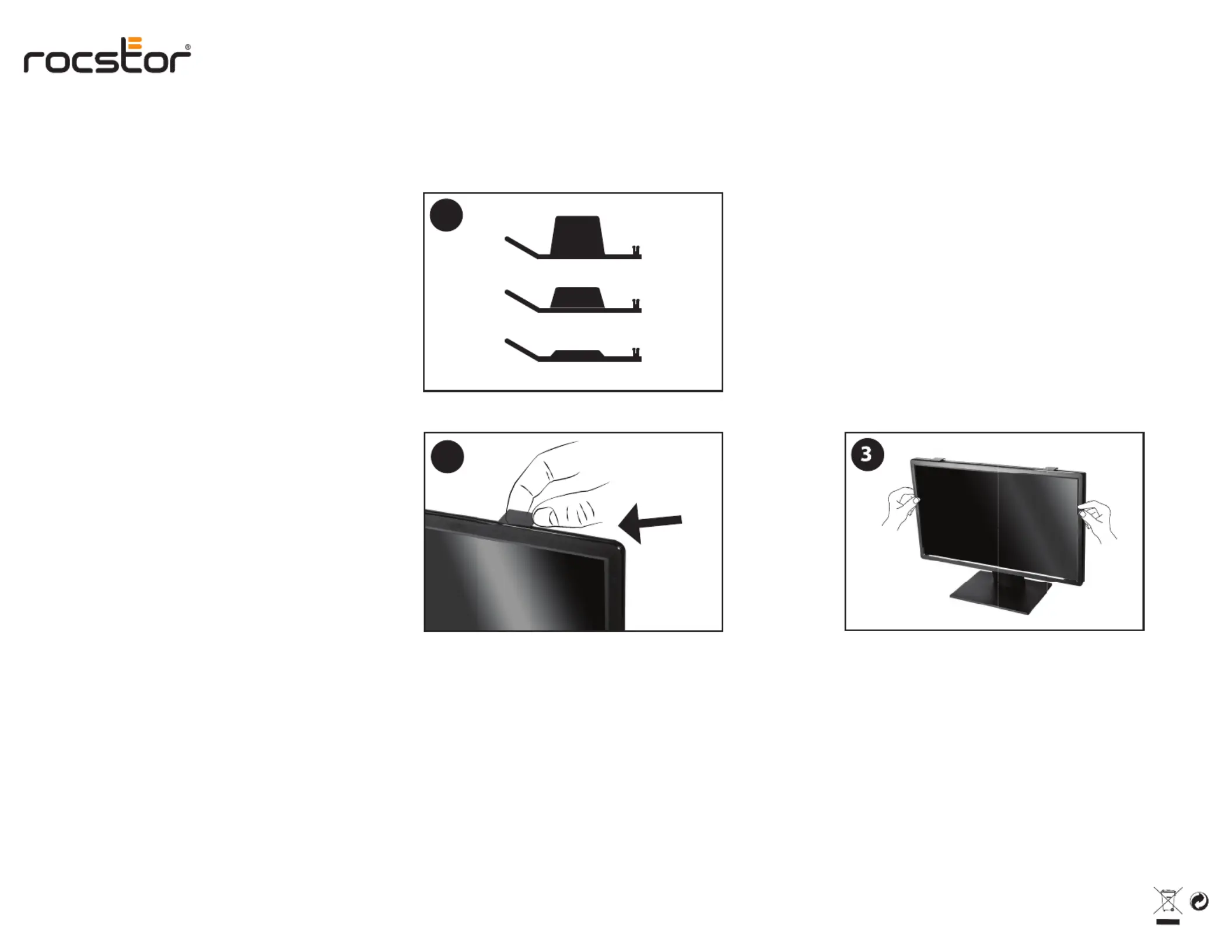
First slide the hanger arms through the top bezel rail.
Hang the lter on monitor.
1
Choose one pair from 3 supplied Hanger Arm sizes.
Elija un par de los 3 tamaños de brazo de suspensión
suministrados.
Choisissez une paire parmi les 3 tailles de bras de
suspension fournies.
Wählen Sie ein Paar aus 3 mitgelieferten Kleiderbügelarmgrößen.
Scegli una coppia tra 3 misure di bracci appendiabiti fornite.
Escolha um par de 3 tamanhos de braço de gancho fornecidos.
从3种随附的吊臂尺寸中选择一对。
3つの付属のハンガーアームサイズから1つのペアを選択します。
제공되는 3 개의 행거 암 크기 중에서 하나를 선택하십시오.
2
Slide the hanger arms through the top bezel rail
Deslice los brazos de suspensión a través del riel delbisel superior.
Schieben Sie die Bügelarme durch die obere Blendenschiene.
Faites glisser les bras de suspension à travers le raildu cadre
supérieur.
Far scorrere i bracci del gancio attraverso la guida dellacornice
superiore.
Schuif de ophangarmen door de bovenste bezelrail
将吊架臂滑过顶部挡板导轨
ハンガーアームを上部ベゼルレールに通します
상단 베젤 레일을 통해 행거 암을 미십시오.
Produktspecifikationer
| Varumärke: | Rocstor |
| Kategori: | ej kategoriserat |
| Modell: | PrivacyView Framed |
Behöver du hjälp?
Om du behöver hjälp med Rocstor PrivacyView Framed ställ en fråga nedan och andra användare kommer att svara dig
ej kategoriserat Rocstor Manualer

29 Mars 2026
28 Mars 2026
27 Mars 2026
27 Mars 2026
27 Mars 2026
26 Mars 2026
26 Mars 2026
ej kategoriserat Manualer
Nyaste ej kategoriserat Manualer
3 April 2026
3 April 2026
3 April 2026
3 April 2026
3 April 2026
3 April 2026
3 April 2026
3 April 2026
3 April 2026