Uniden GMR 3040-2CKHS Bruksanvisning
Läs gratis den bruksanvisning för Uniden GMR 3040-2CKHS (2 sidor) i kategorin Radio. Guiden har ansetts hjälpsam av 18 personer och har ett genomsnittsbetyg på 5.0 stjärnor baserat på 4 recensioner. Har du en fråga om Uniden GMR 3040-2CKHS eller vill du ställa frågor till andra användare av produkten? Ställ en fråga
Sida 1/2
GMR3040-2CKHS
CHARGE
*Range may vary depending on environmental and/or topographical conditions.
•15GMRS/7FRSChannels
•7WeatherChannels
•121SubCodes
(CTCSSToneandDCSCode)
•Upto30MileRange*
•InternalVOXCircuitry
•10SelectableCallToneAlerts
•BacklitLCDDisplay
•2HeadsetBoommics
•HeadsetJack
•2CarabinerClips
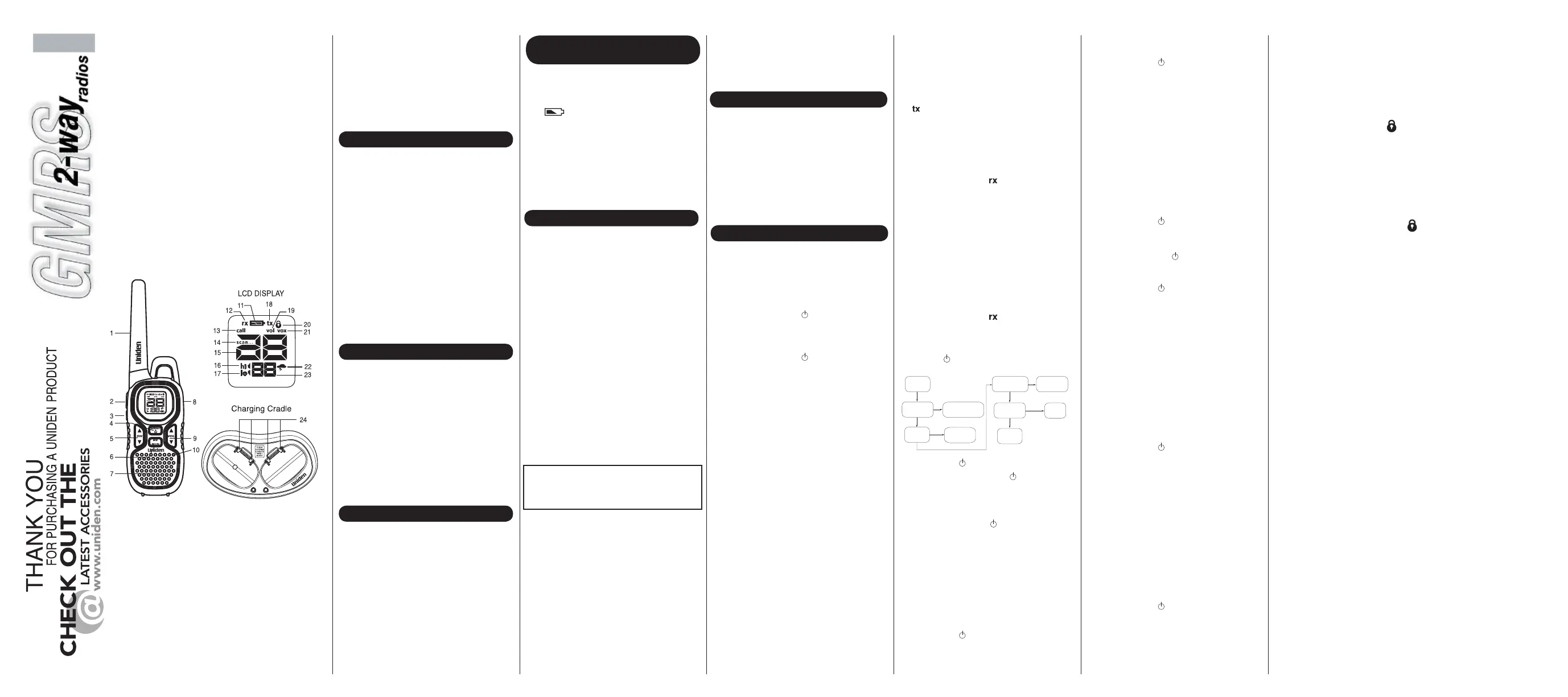
1Antenna
2PTT(Push-To-Talk)Button
3Call/LockButton
4Menu/PowerKey
5ChannelUp/DownKey
6Weather/MonitorKey
7Speaker
8HeadsetJack/DC9V
9VolumeUp/DownKey
10Microphone
11BatteryLevelMeter
12ReceiveIndicator
13CallIndicator
14ScanIndicator
15ChannelIndicator
16HiPowerIndicator
17LowPowerIndicator
18TransmitIndicator
19VolumeSettingIndicator
20KeypadLockIndicator
21VOXIndicator
22WeatherIndicator
23SubCodeIndicator
24ChargingContacts
CongratulationsonyourpurchaseoftheUniden
GMR3040-2CKHS(GeneralMobileRadioService)
radio.Thislightweight,palm-sizedradioisastate-
of-the-artdevice,equippedwithmanyvaluable
features.Useitatsportingevents,tostayin
contactwithfamilyandfriends,hiking,skiing,
outdoors,orinaneighborhoodwatchforvital
communication.
PACKAGE CONTENTS
Yourpackagecontainstworadios,tworechargeable
NiMHbatterypacks,oneACadapter,onecharging
cradle,twoheadsetboommics,twobeltclips,2
carabinerclipsandthisreferenceguide.ANiMH
batterypackor3AAAalkalinebatteries(notincluded)
powerseachunit.Toorderthefollowingoptional
accessories,visitourwebsiteatwww.uniden.comor
call1-800-554-3988duringregularbusinesshours.
•NiMHBatteryPack-#BT-1028orBP-1028
•ChargingCradle-#RC-1287
•Headset-#ZA-133orZA-160
•ACAdapter-#AD-0001
•DCAdapter-#DC-1002
•CarabinerClip-#
TSTD0720002
GMRS LICENSE
INSTALL THE BATTERY
EachradiousesasuppliedNiMHbatterypackor
3AAAalkalinebatteries(notincluded).
ToinstalltheNiMHbatterypack:
1)MakesureyourradioisOFF.
2)Pressthetabatthebottomofthebattery
compartmentdoortoremovethecover.
3)InstalltheNiMHbatterypackintothebattery
compartment.Becertaintofollowthe
instructionswrittenonthelabelonthebattery
pack.Installingthebatterypackincorrectlywill
preventtheunitfromoperating.
4)Replacethebatterycompartmentdoor.
USING THE RADIO
•RogerBeep
•BatteryCharger
•BatteryLevelMeter
•ChannelMonitor
•ChannelScan
•KeypadLock
•DC9VJack
•NOAAEmergency/
WeatherChannels
BATTERY LEVEL AND LOW
BATTERY ALERT
Thisunithasabatterylevelmeteronthedisplayto
indicatethestatusofthebatteries.Whenthe
batteryintheunitislow,thebatterylevelmeter
iconflashes.RechargetheNiMHbattery
packimmediatelyorifyouareusingalkaline
batteries,youmustreplacethealkalinebatteriesin
ordertocontinueusingtheradio.
Toavoidtheriskofpersonalinjuryor
propertydamagefromfireorelectricalshock,only
usetheUnidenaccessoriesspecificallydesignated
forthisproduct.
GMR3040-2CKHS RADIO
CHARGING THE RADIO
IfyouusetherechargeableNiMHbatterypack,two
radioscanbechargeddirectlyorbyusingthe
suppliedchargingcradle.
1)ConnecttheoptionalDCadapter(#DC-1002)to
DC9Vjackoftheradioandtoacigarettelighter
port.
2)Chargethebatterypackfor16hoursuntilthe
batteryindicatorstopsflashing.
1)ConnecttheACadapter(#AD-0001)toDC9V
jackandtoastandard120VACwalloutlet.
2)Setthechargingcradleonthedeskortabletop,
andplacetheradiointhechargingcradlewith
thekeypadfacingforward.
3)MakesurethattheLEDilluminates.Chargethe
batterypackfor16hoursandremovetheradio
fromthechargingcradleaftercharging.
•Forchargingbatteriesdirectlywithoutthecradle,
useonlythe#DC-1002CigaretteLighterAdapter
cord,availablefromwww.Uniden.com.Other
powercordscoulddamageyourradio.
•DC9Vjackoftheradioisforchargingonly.
Besuretoinstallthebatterybeforecharging.
•UseonlythesuppliedbatteryandACadapteror
approvedaccessoriesfromUniden.
•Chargetimemayvarydependingonthebattery
liferemaining.
•Donotrechargealkalinebatteries.Doingsocan
createasafetyhazardordamagetheradio.
•Forfastestcharging,turnofftheradiobefore
charging.
•Thebatterymustbeinstalledfortheunitto
operate,eveniftheunitisalsoconnectedto
externalpower.
Inordertogetthemostoutofyournewradio,read
thisreferenceguidecompletelybeforeattemptingto
operatetheunit.
1)PressandholdMENU/
toturntheradioON,
andincreasethespeakervolumebypressing
VOL▲ .Todecreasethevolume,press
VOL ▼.
2)PressandholdMENU/
againtoturntheradio
OFF.
Yourradioemitsabeepeachtimeoneofthekeys
(exceptforthePTTandCALL/LOCK)ispressed.
ToturnthissoundOFF,pressandholdCALL/
LOCKwhileturningONtheradio.Repeatthisstep
toturnthesoundON.
Yourradiohas22channelsand121Subcodesyou
canusetotalktoothers.Inordertospeakto
someone,eachofyoumustbesettothesame
channelandSubcode.
Tochooseachannel:
Withtheradioin"Normal"operatingmode,pressthe
CH▲/CH ▼keytoincreaseordecreasethe
channelnumberdisplayed.
Channels1-7haveatypicalrangeofupto30
miles.Channels8-14haveatypicalrangeofupto
5miles.Channels15-22haveatypicalrangeofup
to30miles.YoucanseewhichGMRSorFRS
channelisactivebytheicon.Theiconis
displayedwhilescanningGMRSchannels,andthe
iconisdisplayedwhilescanningFRSchannels.
Totalktoothersusingtheradio:
1)PressandholdthePTTbuttonandspeakina
clear,normalvoiceabout2-3inchesawayfrom
themicrophone.Whileyouaretransmitting,the
iconappearsonthedisplay.Toavoidcutting
offthefirstpartofyourtransmission,pause
slightlyafterpressingthePTTbuttonbeforeyou
starttalking.
2)Whenyouhavefinishedspeaking,releasethe
PTTbutton.Youcannowreceiveincoming
calls.Whilereceiving,
displays.
Yourradioallowsyoutolistenforweaksignalson
thecurrentchannelatthepressofakey.
ToturnONMonitormode:
•PressandholdWX/MONfor2secondsuntiltwo
beepssound.Thereceivercircuitstaysopen,
andbothnoiseandweaksignalscanbeheard.
ToturnOFFMonitormode:
•PressandholdWX/MONfor2secondstoreturn
to"Normal"mode;the
iconstopsblinking
anddisappears.
UseMENU/
toaccessyourradio'sadvanced
functions.
Normal
Normal
VOX Level
Call Tone
1-10
OFF, 1-5
Sub Code
Scan
OFF, 1-121
ON/OFF
1)PressMENU/toenterthemenus.
2)AdditionalpressesofMENU/
advanceyou
throughthemenusuntilexitingto"Normal"
operatingmode.
3)OthermethodsofexitingtheMenufunctionare:
a.PressandholdMENU/
again.
b.PressanykeyexceptCH▲/CH▼orVOL▲
/VOL▼andwait10secondsuntiltheunit
returnsto“Normal”mode.
Sub Code
Eachofthechannels1-22mayhaveanyoneof
thecodes,OFF,or1-121selected.Code(OFF)
indicatesnoSubcodeselectedandyourradiocan
receiveasignalregardlessofthecodesettingsof
thetransmittingradio.
1)PressMENU/
toenterMenumode.The
subcodeindicatorflashes.
2)PressCH▲/CH▼keytoincreaseor
throughthespeakerbutwillnotbetransmitted.
Cyclethroughthesetonesandstayonthetone
youwanttoselect.
3)ExitCallTonetosettheselectedtone.
Tolockthekeypad:
1)PressandholdCALL/LOCK;
displays.
ThesefunctionsarenotaffectedbyKeyLock:
•Volumeadjust
•Calltonetransmission
•Entermonitormode
•PTTtransmission
•Poweroff
Tounlockthekeypad:
1)PressandholdCALL/LOCKagain;
disappears.
Yourradiohasacircuitdesignedtodramatically
extendthelifeofthebatteries.Ifthereis
no
transmissionoranincomingcallwithin3seconds,
yourradioswitchestoPowerSavemode.Theradio
isstillabletoreceivetransmissionsinthismode.
TheLCDBacklightautomaticallyturnsONwhenany
key(exceptthePTTbutton)ispressed.TheLCD
displayilluminatesfor10secondsbeforeturning
OFF.
RogerBeepisaBEEPthatissenttonotifytheendof
transmission(bothPTTandVOXtransmission).
RogerBeepcanbeheardthroughthespeakerwhen
bothRogerBeepandKeyBeeparesettoON.When
RogerBeepissettoONandKeyBeepissettoOFF,
RogerBeepwillnotbeheardfromthespeakerbutit
willbetransmittedtoyourparty.WhenRogerBeepis
settoOFF,RogerBeepwillneitherbeheardnor
transmitted.
TochangeRogerBeepsetting:
PressandholdVOL▲whileturningtheradioonand
off.IfRogerBeepisON,itwillbeturnedoff;ifitis
OFF,itwillbeturnedon.
•Ifbatterypowerislow,youcannotoperatethe
radioevenusingexternalpower.Allowthe
batteriestochargebeforeusing.Ifyoutryto
transmitwhilepowerislow,theradiowill
automaticallyturnoff.
decreasethecodenumberdisplayed.You
canalsoselect(OFF)atthisstage.
3)PressMENU/
toexitMenumode.
4)PressanykeyotherthanCH▲/CH▼or
VOL▲/VOL▼andtheradioreturnsto
Idlemodein10seconds.
Scan
Yourradiohasachannelscanfeaturethat
allowsyoutoeasilyscanall22channels.
Whenanactivechannelisdetected,theradio
pausesonthatchanneluntilthechannelis
clear.Then,aftera2seconddelay,theradio
continuesscanning.PressingthePTTbutton
whilethescanispausedonachannelallows
youtotransmitonthatchannel.
ToturnONchannelscan:
1)PressMENU/
repeatedlyuntilthe
iconandblink.
2.PressCH▲/CH▼ toselectScanmode
andpressMENU/
tostartit.
ToturnOFFchannelscan:
1)PressMENU/
whenthescansettingis
.
2)PressanykeyotherthanCH▲/CH▼or
VOL▲/VOL▼toturnchannelscanoffin
10seconds.
Voice Operated Transmission
Yourradioisequippedwithauserselectable
VoiceOperatedTransmitter(VOX)thatcanbe
usedforautomaticvoicetransmissions.The
VOXfeatureisdesignedtobeusedwithor
withoutaheadsetwithamicrophone.
Transmissionisinitiatedbyspeakingintothe
microphoneinsteadofpressingPTT.
ToselectVOXlevel:
1)PressMENU/
repeatedlyuntilthe
iconandtheVOXsensitivitylevel
(
OFF
,
1-5
)
blink
.
2)PressCH▲/CH▼tochangetheVOX
sensitivitylevels.Uselevel1forincreased
sensitivitytovoiceinnormallyquiet
environments
,anduseahigherlevelto
reduceundesiredactivationinverynoisy
environments.
Call Tone
Yourradioisequippedwith10selectablecall
tonesthataretransmittedwhenCALL/LOCKis
pressed.
Toselectacalltone:
1)PressMENU/
repeatedlyuntilthe
CALL
iconand
CallTone
starttoblinkonthe
display
.
2)PressCH▲/CH▼tomovethroughthe
availablecalltones.Eachtonewillbeheard
USING A HEADSET
Youcanuseaheadset(#ZA-133orZA-160)for
moreprivatecommunications.Touseaheadset,
lifttherubbercoverfromovertheheadsetjack,
thenplugintheheadset.
Yourradioisnotweatherresistant
whenusingaheadsetjack.Whenyouremovethe
headset,besuretofullypressthejackcoverinto
placetorestoreitsweatherresistantcapability.
U01UT063ZZA(0)
English
Produktspecifikationer
| Varumärke: | Uniden |
| Kategori: | Radio |
| Modell: | GMR 3040-2CKHS |
| Vikt: | 907 g |
| Maximal räckvidd: | 48280 m |
| Antal kanaler (totalt): | 22 kanaler |
| Bakgrundsbelyst skärm: | Ja |
| Arbetsfrekvens: | - MHz |
| Indikator för låg batterinivå: | Ja |
| Uppladdningsbara: | Ja |
| Bälteshållare: | Ja |
Behöver du hjälp?
Om du behöver hjälp med Uniden GMR 3040-2CKHS ställ en fråga nedan och andra användare kommer att svara dig
Radio Uniden Manualer

2 Februari 2026
2 Februari 2026
27 September 2025
27 September 2025
26 September 2025
26 September 2025
26 September 2025
26 September 2025
26 September 2025
26 September 2025
Radio Manualer
Nyaste Radio Manualer
30 Mars 2026
28 Mars 2026
22 Mars 2026
19 Mars 2026
16 Mars 2026
16 Mars 2026
12 Mars 2026
12 Mars 2026
11 Mars 2026
5 Mars 2026