Bauhn APB27GMC-0725 Bruksanvisning
Bauhn ej kategoriserat APB27GMC-0725
Läs gratis den bruksanvisning för Bauhn APB27GMC-0725 (2 sidor) i kategorin ej kategoriserat. Guiden har ansetts hjälpsam av 24 personer och har ett genomsnittsbetyg på 4.0 stjärnor baserat på 4 recensioner. Har du en fråga om Bauhn APB27GMC-0725 eller vill du ställa frågor till andra användare av produkten? Ställ en fråga
Sida 1/2
Cannot charge
device
• Make sure the USB cable is plugged into the output port; unplug the USB cable
and try again.
• Try another USB cable and/or USB port.
• Some devices require higher outputs to charge. Please check with your devices
• The power bank will turn off automatically when an minimum load (about 50mA)
is not detected.
• The power bank has built-in temperature protect sensor. Keep the power bank
away from heat, high temperatures and direct sunlight.
Cannot charge
device whilst
charging power
bank
• The power bank can not support the output whilst being charged.
• Please wait until the power bank is fully charged.
No Digital
Display when
charging device
• Connect the power bank to your power source to ensure the power bank has
• Press baer thetty s tto ch a.tatusbuton eck batterysttus
Capacity drops• It is normal for the capacity to slowly drop after a certain usage cycle.
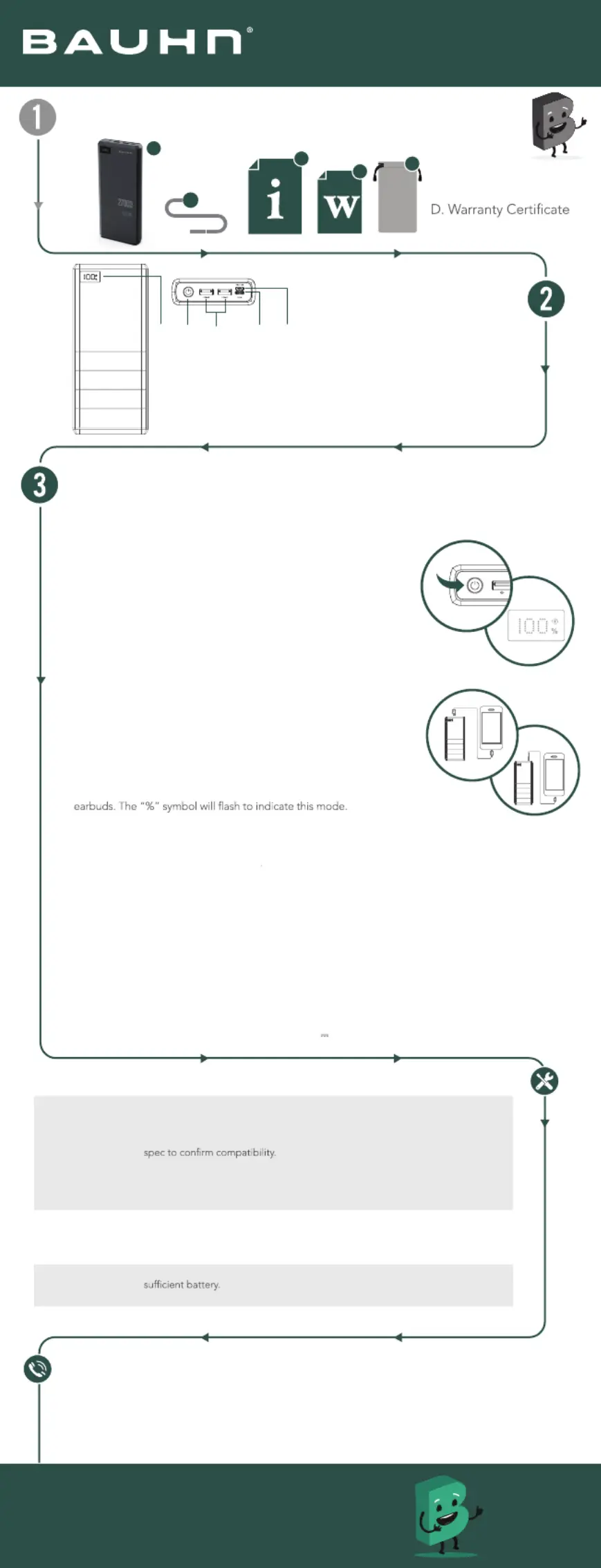
Product Overview
Have you got everything?
Operation
A. Power Bank
B. USB-C Cable
C. User Guide
E. Pouch
Power/off on
• Presspor the webuttoorn n t tun o thepownk.Thdislaear b e LEDpyl will ight up and show the
remanr.inig wepo
• Pressanho d ldtheowon peuttr btrfew .o tun of th poerbank
Chargiysng our device
• Cot pl -a y nnec thesupiedUSBC cbleor ourdevicesca boe le t th
relevntorana pt d th oteher end to yor duevice.
• D whThLEe displayshos te power remaining as aera from pcentge
0%100%-.
• hreneroWhen te maiing powr dps lowe thn 5%, tED displrahe Lay
sttblin hoo nars kingto display te lw pwerwaring.
• a rg e a When fstchaingmod isactivted,theindicaigt lor willhp t u
green.
• Ifo n devicesrergeo lu of a being chad, the pwerbank wil trnf after0 1
son.ecds
• harWhen cgiipldeicesamnug mlte vs ate time, thepowerall bnk wi
eta xi fstchingmodanarg e d ite cha will sharrging owyope r tour
coecedevicesnnt d.
A. Power Button
B. USB-A output
C. USB-C input/output
D. Micro USB input
E. LED Display
• Battery percentage
• Quick charging indicator
Give us a call
What? You mean this User Guide didn’t have ALL the answers? Speak to us!
We’d love to help you get up and running as quickly as possible.
Call our on . After Sales Support1300 002 534
Operating hours: Monday-Friday, 8:30am-6pm; Saturday, 9am-6pm AEST
Enjoy using your product!
Well done, you made it.
Now sit back and relax... your product is
automatically covered by a 1-year warranty.
How nice!
Troubleshooting
User Guide
Model: APB27GMC-0725-B
knaB rewoP hAm00072
EACD
B
C
D
E
A
B
TrCrgieickle hang Mod
• Dolclube-ick theo activae t powon er buttttrickle cg mode foharginr
chargi h raeng lowow-per devicessuc assmat wtchs,smarnds ta band
• p ll orfe The ower bankwiaut tun of th tricklechaingmorg dter e af
approe s.ximatly 2hour
• Presspor the webuttoonrfn t maually tun of trickl chg moearginde.
• Ifie hghwe-por dviccteoweeres ae conndp, the r ball nk wi
aumattoicatully rn off tricklginear chgde. mo
Chargiywkng our poer ban
• Cot pl -a Connec thesupiedUSBC cbleto the USB- prt of thank and the oher end to youeo pwer btr
porrce. we sou
• D whThLEe displayshos te power remaining as aera fr. pcentgeom 0%-100%
• ha rg e t When te fstchaingmod isactivaed,theindical igh tlor wiltp u green.
• hsyeWhen te dipla indicats 100% th powr bnk is fueeall.
• sh Pleae e useiterUSBble(includd) -C ca eoro odrr MicUSB cable (nt inclued) for chaging tr he powe
bank.
• Ifo yu conect evices er ndtewo th pobankchging t while i isar. Powill rwer be shaed and chaging timre
will bede extend.
N werote:PD(Po
Delery) is supporthorrived via te cecd tSn UB-C cables adevices.
If yowu antarge your dees toe(V to chvic exced 60W 20
3A), recommendB-it Susing UCw cable h
E-Makeincludrr (ed).
USB-A output
USB-C output
Produktspecifikationer
| Varumärke: | Bauhn |
| Kategori: | ej kategoriserat |
| Modell: | APB27GMC-0725 |
Behöver du hjälp?
Om du behöver hjälp med Bauhn APB27GMC-0725 ställ en fråga nedan och andra användare kommer att svara dig
ej kategoriserat Bauhn Manualer

9 Oktober 2025
8 Oktober 2025
8 Oktober 2025
8 Oktober 2025
9 September 2025
9 Augusti 2025
4 Augusti 2025
ej kategoriserat Manualer
Nyaste ej kategoriserat Manualer
3 April 2026
3 April 2026
3 April 2026
3 April 2026
3 April 2026
3 April 2026
3 April 2026
3 April 2026
3 April 2026