Flir Chameleon3 Bruksanvisning
Flir Inte kategoriserad Chameleon3
Läs gratis den bruksanvisning för Flir Chameleon3 (2 sidor) i kategorin Inte kategoriserad. Guiden har ansetts hjälpsam av 51 personer och har ett genomsnittsbetyg på 4.9 stjärnor baserat på 9 recensioner. Har du en fråga om Flir Chameleon3 eller vill du ställa frågor till andra användare av produkten? Ställ en fråga
Sida 1/2
G
G
G
GGETTI
ETTI
ETTI
ETTIETTING
NG
NG
NGNG
STARTE
STARTE
STARTE
STARTESTARTED
D
D
DD
FLIR
CHAMELEON®3
USB3
Vision
Will
Will
Will
WillWilly
y
y
yyo
o
o
oou
u
u
uur
r
r
rrsyste
syste
syste
systesystem
m
m
mmsup
sup
sup
supsuppo
po
po
popor
r
r
rrt
t
t
ttthe
the
the
thethec
c
c
cca
a
a
aamera?
mera?
mera?
mera?mera?
RecommendedSystemConfiguration:
nOS—Windows,Linux(32-and64-bit)
nCPU—IntelCore2Duo,orequivalent
nRAM—2GBRAM
nVideo—128MB
nPorts—PCIe2.0compatiblehostcontrollerwithUSB3.1connector
nSoftware—MicrosoftVisualStudio2010(tocompileandrunexample
code)
SeeTechnicalApplicationNote10359forinformationonrecommendedsystem
componentsforUSB3.0.
D
D
D
DDo
o
o
ooy
y
y
yyo
o
o
oou
u
u
uuh
h
h
hhav
av
av
avave
e
e
eea
a
a
aad
d
d
ddo
o
o
oown
wn
wn
wnwnlo
lo
lo
loloads
ads
ads
adsadsa
a
a
aacc
cc
cc
cccco
o
o
oou
u
u
uunt?
nt?
nt?
nt?nt?
Ourdownloadspagehasmanyresourcestohelpyouoperateyourcamera
effectively,including:
nSoftware,includingDrivers(requiredforinstallation)
nFirmwareupdatesandreleasenotes
nDimensionaldrawingsandCADmodels
nDocumentation
Toaccessthedownloadsresourcesyoumusthaveadownloadsaccount.
1.Gotoourwebsite:www.flir.com/iis.
2.Intheupperrightcorner,clickRegister.
3.Completetheform,thenclick.Register
Afteryousubmityourregistration,youwillreceiveanemailwithinstructionson
howtoactivateyouraccount.
D
D
D
DDo
o
o
ooy
y
y
yyo
o
o
oou
u
u
uuh
h
h
hhav
av
av
avave
e
e
eea
a
a
aall
ll
ll
llllthe
the
the
thethep
p
p
ppa
a
a
aar
r
r
rrts
ts
ts
tstsy
y
y
yyou
ou
ou
ouounee
nee
nee
neeneed?
d?
d?
d?d?
Toinstallyourcamerayouwillneedthefollowingcomponents:
nUSB3.1cable
nLens
nTripodadapter(optional)
nInterfacecard
FLIRsellsanumberoftheadditionalpartsrequiredforinstallation.Topurchase,
visitourAccessoriespage.
Ca
Ca
Ca
CaCamera
mera
mera
merameraCa
Ca
Ca
CaCare
re
re
rere
Tocleantheimagingsurfaceofyourcamera,followthestepsoutlinedin
KnowledgeBaseArticle10243.
Extendedexposuretobrightsunlight,rain,dustyenvironments,etc.maycause
problemswiththeelectronicsandopticsofthesystem.
Avoidexcessiveshaking,dropping,ormishandlingofthedevice.
Warning!Donotopenthecamerahousing.DoingsovoidstheHardware
Warranty.
Avoidelectrostaticcharging.
I
I
I
IIns
ns
ns
nsnsta
ta
ta
tatalling
lling
lling
llingllingY
Y
Y
YYo
o
o
oou
u
u
uur
r
r
rrI
I
I
IIn
n
n
nnterf
terf
terf
terfterfac
ac
ac
acace
e
e
eeC
C
C
CCa
a
a
aar
r
r
rrd
d
d
dda
a
a
aand
nd
nd
ndndSo
So
So
SoSof
f
f
fftware
tware
tware
twaretware
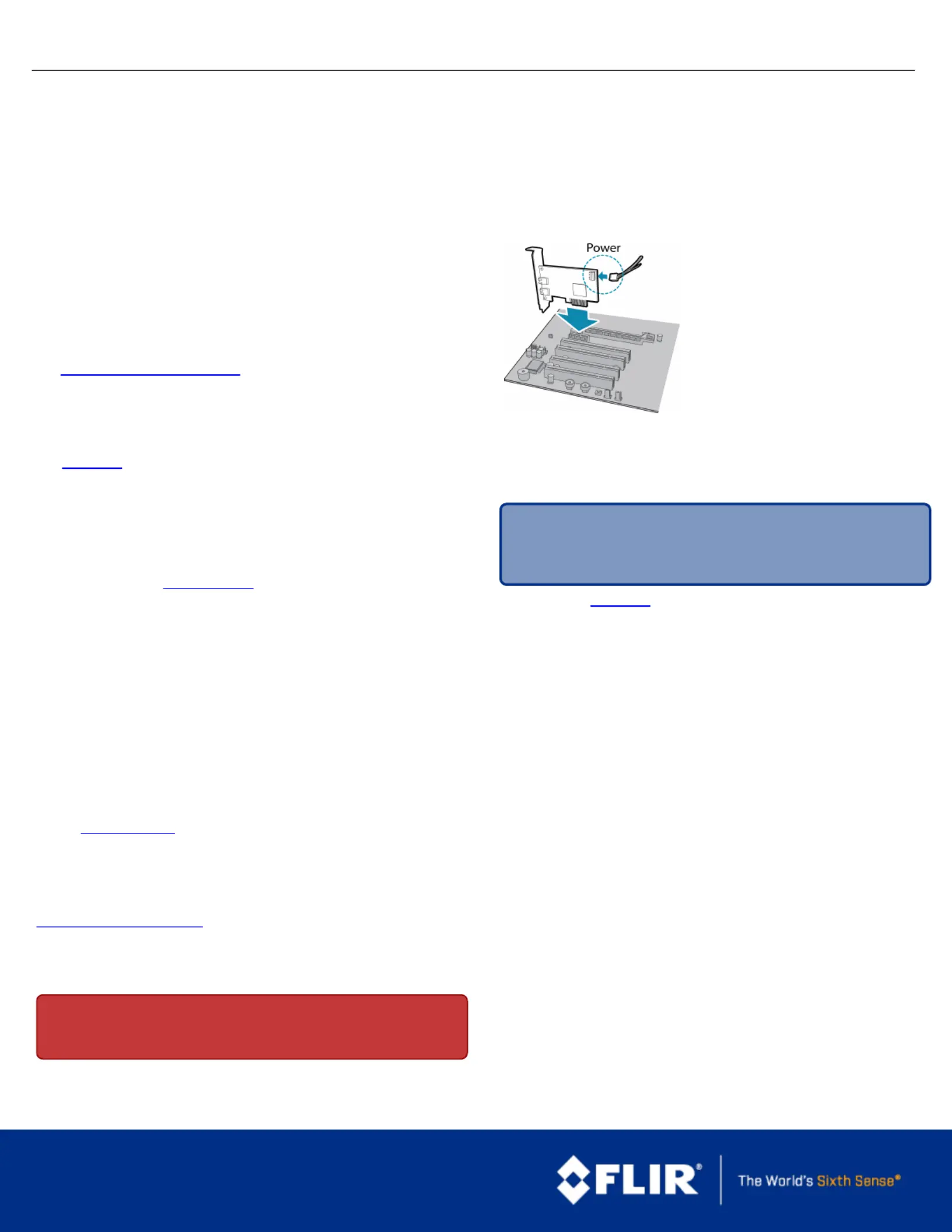
1.InstallyourInterfaceCard
Ensurethecardisinstalledperthe
manufacturer'sinstructions.
ConnecttheinternalIDEorSATApower
connectoronthecardtothecomputer
powersupply.
Alternatively,useyourPC'sbuilt-inhost
controller,ifequipped.
OpentheWindowsDeviceManager.Ensurethecardisproperlyinstalledunder
UniversalSerialBusControllers.Anexclamationpoint(!)nexttothecard
indicatesthedriverhasnotyetbeeninstalled.
2.InstalltheFlyCapture®Software
Note:ForexistinguserswhoalreadyhaveFlyCaptureinstalled,we
recommendensuringyouhavethelatestversionforoptimalperformance
ofyourcamera.IfyoudonotneedtoinstallFlyCapture,usethe
DriverControlGUItoinstallandenabledriversforyourcard.
a.Logintoourdownloadspage.
b.Selectyourandfromthedrop-downlistsandCameraOperatingSystem
clickthebutton.Search
c.ClickontheSoftwaresearchresultstoexpandthelist.
d.Clicktheappropriatelinktobeginthedownloadandinstallation.
Afterthedownloadiscomplete,theFlyCapturesetupwizardbegins.Ifthe
wizarddoesnotstartautomatically,double-clickthe.exefiletoopenit.Follow
thestepsineachsetupdialog.
3.EnabletheDriversforthecard
Duringinstallation,youarepromptedtoselectyourinterfacedriver.
IntheInterfaceDriverSelectiondialog,selecttheIwilluseUSBcameras.
Thisselectionensuresthepgrxhci(USBPro)andpgrusbcamdriversare
installed.
Touninstallorreconfigurethedriveratanytimeaftersetupiscomplete,usethe
DriverControlGUI.
1/26/2017
Namesandmarksappearingontheproductshereinareeither
registeredtrademarksortrademarksofFLIRSystems,Inc.
and/oritssubsidiaries.
©2015-2017FLIRIntegratedImagingSolutionsInc.Allrights
reserved.
Produktspecifikationer
| Varumärke: | Flir |
| Kategori: | Inte kategoriserad |
| Modell: | Chameleon3 |
Behöver du hjälp?
Om du behöver hjälp med Flir Chameleon3 ställ en fråga nedan och andra användare kommer att svara dig
Inte kategoriserad Flir Manualer

30 Januari 2025
23 September 2024
23 September 2024
18 September 2024
17 September 2024
16 September 2024
16 September 2024
16 September 2024
16 September 2024
16 September 2024
Inte kategoriserad Manualer
Nyaste Inte kategoriserad Manualer
9 April 2025
9 April 2025
9 April 2025
9 April 2025
9 April 2025
9 April 2025
9 April 2025
9 April 2025
9 April 2025
9 April 2025