LevelOne KVM-9036 Bruksanvisning
LevelOne Inte kategoriserad KVM-9036
Läs gratis den bruksanvisning för LevelOne KVM-9036 (2 sidor) i kategorin Inte kategoriserad. Guiden har ansetts hjälpsam av 24 personer och har ett genomsnittsbetyg på 4.0 stjärnor baserat på 8 recensioner. Har du en fråga om LevelOne KVM-9036 eller vill du ställa frågor till andra användare av produkten? Ställ en fråga
Sida 1/2
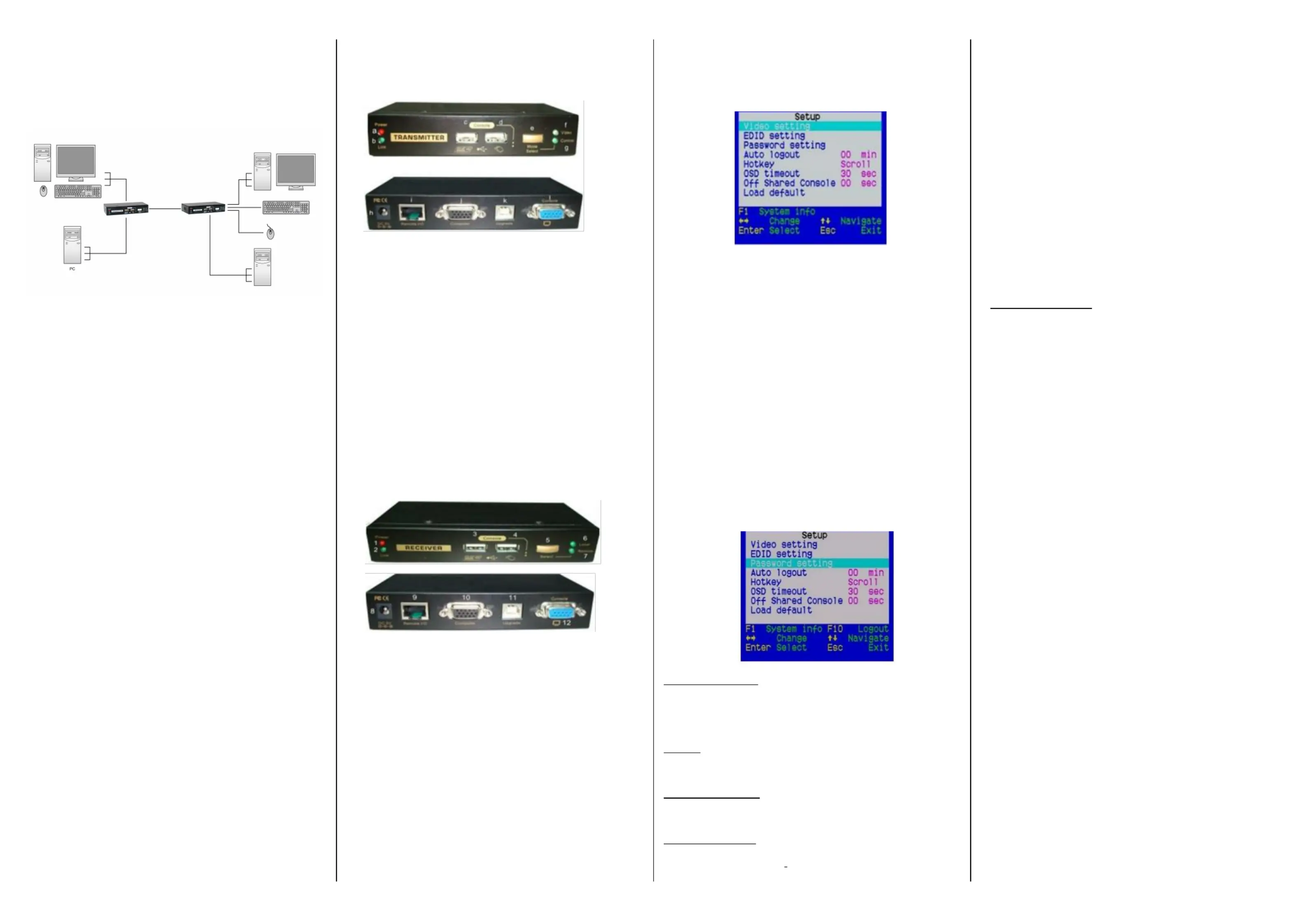
KVM-9036 CAT5 USB KVM Extender
CAT5 USB KVM Extender
Transmitter (Tx) Unit x 1
Receiver (Rx) Unit x 1
USB Cable x 2KVM
Power Adapters (DC5V) x 2
This Quick Installation Guide x 1
Transmitter Unit (Local End Connection) )
[Tx Front-panel]–
a.Power LED (Lights when power on)is
b.Link LED (Lights when link on)is
c.USB keyboard connector
d.USB mouse connector
e.Select Button for Receiver Mode (View Only/Full
Access/Access Deny)
f.Video LED (Lights when Remote Console monitor is on)
g.Control LED (Lights when Remote Console on)is
[Tx Back panel]–
h.Power jack (DC5V, center-positive)
i.
CAT5 Extension Port [RJ-4connect 5, to the Receiver Unit
viaa CATx UTP cable, 100Mmax.]eter
j.Computer port [HDB-15(VGA), connect to the (Local)
computer using a special 3-in-1 KVM Combo-free cable]
Upgrade port (USB Type dedicated for rmware upgradeB,
use)
Receiver Unit (Remote End Connection)
[Rx-front panel]
1.Power LED (Lights when power on)is
2.Link LED (Lights when link on)is
3.USB keyboard connector
4.USB mouse connector
5.Toggle Button for Local / Remote Computers
6.Local Computer LED (Lights when Local computer active)
7.
Remote Computer LED (Lights when Remote computer active)
[RX-back-panel]
8.Power jack (DC5V, center-positive)
9.
CAT5 Extension Port [RJ-4connect 5, to the (Remote)
computer via a CATx UTP cable, 100 Meter max
10.Computer port [HDB-15(VGA), connect the (Local)to
computer using a special 3-in-1 Combo-free cable]KVM
11.Upgrade Port (USB Type dedicated for firmware upgradeB,
use)
12.Console Video port [HDB-15(VGA), connect monitor]to
OSD Main Menu
On theReceiverUnit,theOSD(on-screendisplay)Menu
control available isto facilitate more intuitive operations. Users
can congure various settings by the OSD Menu:
OSD Menu
To navigate the OSD Menu, just use the following keys
Esc: Exit,
→Left/Right cursor: change value the menu optionin
Up/Down Cursor: Navigate.
F10: Logout the OSD Menu (However, the password if
protection isnot enabled, the Logout feature will not be
available)
Hotkey sequence = [Scroll Lock]+ [Scroll Lock]+ H +(y)** *
(y) = CAPS, F12 NUMor
⚫ Note that the hotkey preceding sequence setting the on
Receiver Console will not aect the hotkey preceding
sequence on the Transmitter Console, which will always
allow Scroll Lock + Scroll Lock preceding hotkey. asIn
addition using the hotkey command and can also use the to
OSD menu change the hotkey preceding sequence.to
Please refer the previous section.to
Auto logout: [0 ~ 10]
Disable / Enable the Logout timeout (0~10min, 0 = Disable).
The Auto logout time can congured from 0 (Disable), right beup
to Min. 10If the password protection not enabled, the Auto is
logout will not beput into function.
Hotkey: [Scroll Lock (Default)]
To change
the preceding sequence hotkey pressby, →to select
the CAPS, F12 or NUM.
OSD Timeout: [0~60]
Congured the OSD timeout value, start at seconds, with 20an
increment 5 ofup seconds (0~60 seconds, 0 = Disable).to60
O Shared Console
Congured the Console Control [(Disable/Enable the timeout value
(0~30 seconds, 0= Disable)]
Note:Local Remoteswitching engagedpriorityoffers and
“Deadlock Function, the deadlock function protect while al”toone
us
er (either one) was using, the other user have wait until the to
rst user released the process, then the other user can start to use.
When the deadlock active, the isTransmitter’s LED “Video” &
“Control” ashing, until the user released the process control.is
⚫ The blue component color adjusted automatically isasin
proportion the red and green. Users need adjust todonoto
⚫
themselves.
In order achieve optimized video output toon the console
that may 100MMeters away from the computer, users be
could adjust these various parameters conscientiously to
achieve anon optimized video output the console monitor.
For a general guideline how adjust your video display of to
parameters the remote console, please refer next on to
section, Optimize the Video Display the Remote Console.on
Load Default Settings
Load the factory default settings.
FCC / CE Statements
FCC Statement: This equipment has been tested and found to
comply with the regulations for a Class B digital device, pursuant to
Part 15of the FCC Rules. These limits are designed provide to
reasonableprotectionagainstharmfulinterferencewhenthe
equipmentoperateda is in commercialenvironment.This
equipment generates, uses,andcan radiateradio frequency
energy and, ifnot installed and used accordance with this Quick in
InstallationGuide,may causeharmfulinterferenceradio to
communications. Operation this equipment a residential area ofin
is likely cause harmful interference which case, the user will toin
be required correct the interference toat his/her own expense.
CE Statement: This a Class B product a domestic isin
environment, this product may cause radio interference, which in
case the user may required take adequate measures.beto
Deutsch
Installationsschema.
Français
Schéma d'installation.
Español
Diagrama de instalación.
Italiano
Diagramma di installazione.
Português
Diagrama de instalação
English
Installationdiagram
Produktspecifikationer
| Varumärke: | LevelOne |
| Kategori: | Inte kategoriserad |
| Modell: | KVM-9036 |
| Höjd: | 139 mm |
| Förpackningens bredd: | 204 mm |
| LED-indikatorer: | Ja |
| Ursprungsland: | Taiwan |
| Material: | Metall |
| Modell: | Sändare och mottagare |
| Snabbinstallationsguide: | Ja |
| Sändarens vikt: | 586 g |
| Kabeltyper som stöds: | Cat5, Cat5e |
| Produktens färg: | Svart |
| Låddjup: | 176 mm |
| Vikt inkl. förpackning: | 1692.4 g |
| Ytterförpackningens bruttovikt: | 21300 g |
| Ytterförpackningens höjd: | 430 mm |
| Produkter per ytterförpackning: | 12 styck |
| Ytterförpackningens längd: | 370 mm |
| Lastpallens totalbredd: | 1350 mm |
| Lastpallens totalhöjd: | 115 mm |
| Lastpallens totallängd: | 940 mm |
| Ytterförpackningens bredd: | 440 mm |
| Temperatur vid drift: | 0 - 40 ° C |
| Temperaturintervall (förvaring): | -5 - 65 ° C |
| Intervall för relativ operativ luftfuktighet: | 5 - 95 % |
| Fuktighet (förvaring): | 5 - 95 % |
| Hållbarhetscertifiering: | CE, Federal Communications Commission (FCC), UKCA, WEEE |
| Kabel inkluderad: | KVM |
| Anslutningsteknologi: | Kabel |
| Firmware kan uppgraderas: | Ja |
| AC-adapter inkluderad: | Ja |
| Antal USB 2.0 anslutningar: | 2 |
| Plug & Play-kompatibel: | Ja |
| Maximal överföringshastighet avstånd: | 100 m |
| Uppfyller hållbarhetskrav: | Ja |
| Typ av USB-port: | USB Typ B |
| Skärmgränssnitt (OSD): | Ja |
| Maximal analog upplösning: | 1920 x 1200 pixlar |
| Mottagarvikt: | 586 g |
| Mottagare, bredd: | 131 mm |
| Mottagare, djup: | 65 mm |
| Mottagare, höjd: | 26 mm |
| Porttyp för lokal videmottagare: | VGA |
| Porttyp för lokal mus-/tangentbordssändare: | USB |
| Porttyp för videosändare: | VGA |
| Antal RJ-45 portar (mottagare): | 1 |
| Antal RJ-45 portar (sändare): | 1 |
| Sändare, djup: | 65 mm |
| Sändare, höjd: | 26 mm |
| Sändare, bredd: | 131 mm |
| Porttyp för lokal mus-/tangentbordsmottagare: | USB |
| Lokal videoport för sändare: | Ja |
| Porttyp för lokal videosändare: | VGA |
| KVM portval: | Hotkeys, Push-buttons |
Behöver du hjälp?
Om du behöver hjälp med LevelOne KVM-9036 ställ en fråga nedan och andra användare kommer att svara dig
Inte kategoriserad LevelOne Manualer

8 Januari 2025
31 December 2025
22 Oktober 2024
22 Oktober 2024
22 Oktober 2024
22 Oktober 2024
26 September 2024
26 September 2024
25 September 2024
25 September 2024
Inte kategoriserad Manualer
Nyaste Inte kategoriserad Manualer
9 April 2025
9 April 2025
9 April 2025
9 April 2025
9 April 2025
9 April 2025
9 April 2025
9 April 2025
9 April 2025
9 April 2025