Stanley S300 Bruksanvisning
Läs gratis den bruksanvisning för Stanley S300 (50 sidor) i kategorin Inte kategoriserad. Guiden har ansetts hjälpsam av 22 personer och har ett genomsnittsbetyg på 4.9 stjärnor baserat på 2 recensioner. Har du en fråga om Stanley S300 eller vill du ställa frågor till andra användare av produkten? Ställ en fråga
Sida 1/50
REV A 12STHT77407
S300
8
1
77407
Stanley Stud Sensor 300
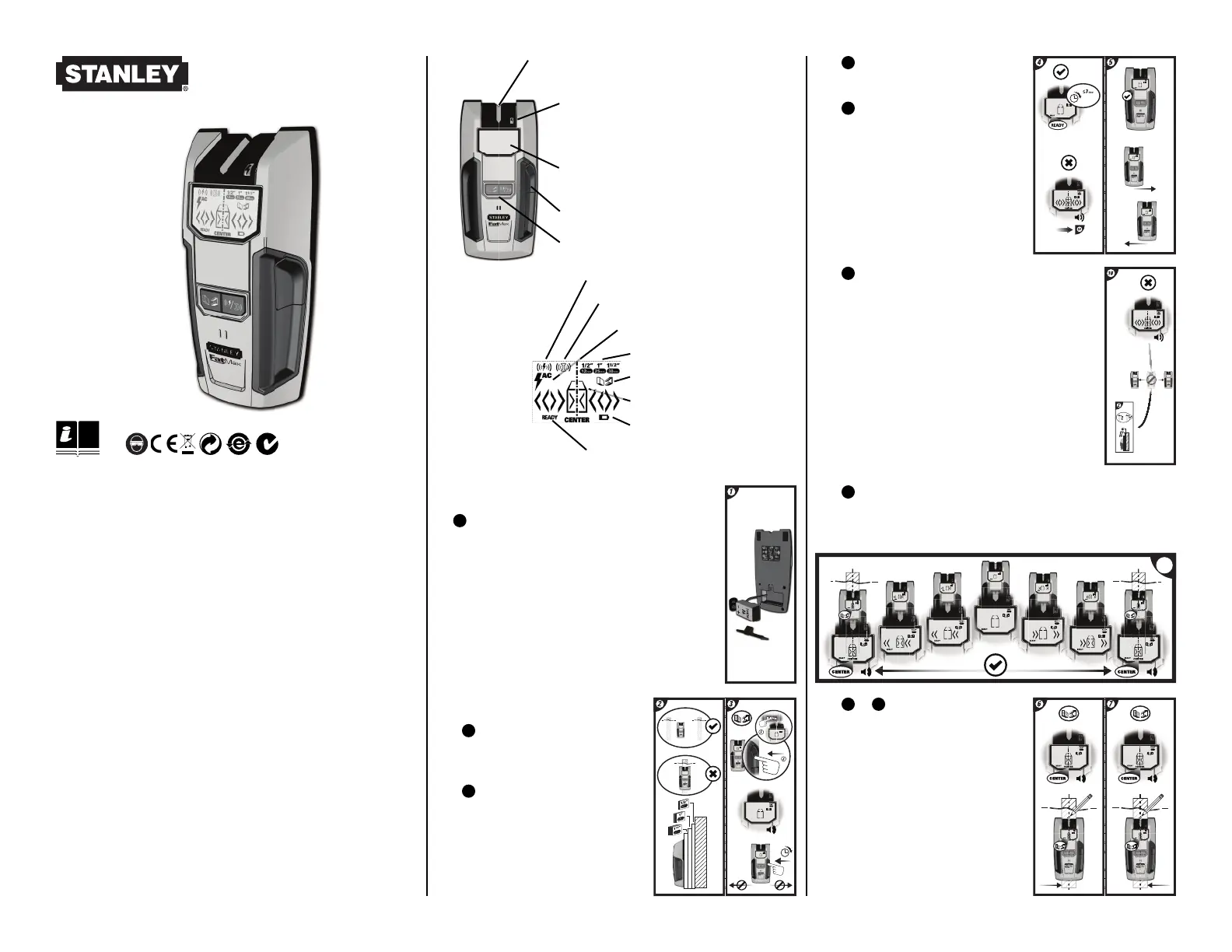
The Stud Sensor 300 uses electronic signals to locate the center of studs, joists
or live AC wires through drywall or other common building materials. Once
the center of a stud has been detected in one pass across the surface, the
Stud Sensor 300 gives a visual display and sounds an audible tone. A marking
channel allows you to easily note the stud center and edges on the wall.
The Stud Sensor 300 will not detect objects in concrete, mortar, block or brick
work, carpeting, foil faced materials, metallic surfaces or ceramic tiles. The
Stud Sensor 300 is not designed to locate non-ferrous or plastic objects such
as pipes.
Note: Read all instructions prior to operating the Stud Sensor 300 and DO NOT
remove any labels from the tool.
WARNING:
Protect Your Eyes, Wear Safety Goggles.
Usage
Detecting Wood / Metal Studs
2
Hold the Stud Sensor 300 fl at
against the surface, making fi rm
contact.
3
Press in and hold the activation
button. A series of tones will sound.
Note:The unit cannot be moved before
calibration is complete.
6
/
7
When it detects the stud
center, the “Center” icon will appear on
the LCD and an audible tone will sound.
Use the marking channel located at the
top of the unit to mark the stud center.
OPERATING INSTRUCTIONS
Battery
1
Open door on back of unit and connect a 9 volt battery
(not included) to clip. Put battery back into case and close
back battery door.
Note: Recommend to replace a new 9 volt battery
when low battery - “Low Battery” will appear on the
LCD.
10
If all segments of the LCD fl ash on and off when
the activation button is pressed, move the Stud Sensor
300 to a different location and try again. Releasing the
activation button will turn off the sensor.
Note:While calibrating, the Stud Sensor 300 must not
be placed directly over a stud, dense material such as
metal, or over a wet or newly painted area, or it will not
properly calibrate.
8
Slide the Stud Sensor 300 slowly across the surface in a straight line.
As it detects a stud, the unit will display the relative position of the stud
on the screen.
• Marking Channel
• Live Wire Warning LED
• LCD Display
• Activation Button
• METAL SCAN Mode
• Stud Location Graphic
• Self-Calibration Complete
• Depth Detection Mode
4
When the unit is calibrated the
“Ready” icon will appear on the LCD.
5
Keep holding the activation button
during all of the following procedures.
Note: Once the Activation button is
released, the unit shuts off.
• STUD or METAL / AC Mode Selection
• Live Wire Detected
• STUD Mode
• Low Battery Indicator
• AC TRACKING Mode
Produktspecifikationer
| Varumärke: | Stanley |
| Kategori: | Inte kategoriserad |
| Modell: | S300 |
Behöver du hjälp?
Om du behöver hjälp med Stanley S300 ställ en fråga nedan och andra användare kommer att svara dig
Inte kategoriserad Stanley Manualer

28 Mars 2025
3 Oktober 2024
26 September 2024
26 September 2024
26 September 2024
23 September 2024
20 September 2024
20 September 2024
19 September 2024
9 September 2024
Inte kategoriserad Manualer
Nyaste Inte kategoriserad Manualer
9 April 2025
9 April 2025
9 April 2025
9 April 2025
9 April 2025
9 April 2025
9 April 2025
9 April 2025
9 April 2025
9 April 2025