Oricom VISO8 Bruksanvisning
Oricom Inte kategoriserad VISO8
Läs gratis den bruksanvisning för Oricom VISO8 (3 sidor) i kategorin Inte kategoriserad. Guiden har ansetts hjälpsam av 40 personer och har ett genomsnittsbetyg på 4.7 stjärnor baserat på 6 recensioner. Har du en fråga om Oricom VISO8 eller vill du ställa frågor till andra användare av produkten? Ställ en fråga
Sida 1/3
VISO8 USER GUIDE
KEEP THIS USER GUIDE FOR FUTURE REFERENCE
Always retain your proof of purchase in case of
warranty service.
AUSTRALIA: www.oricom.com.au
1
Features
‐Clock Format Day/Date/Month/Year
‐Fixture hanging hole or desktop stand
2
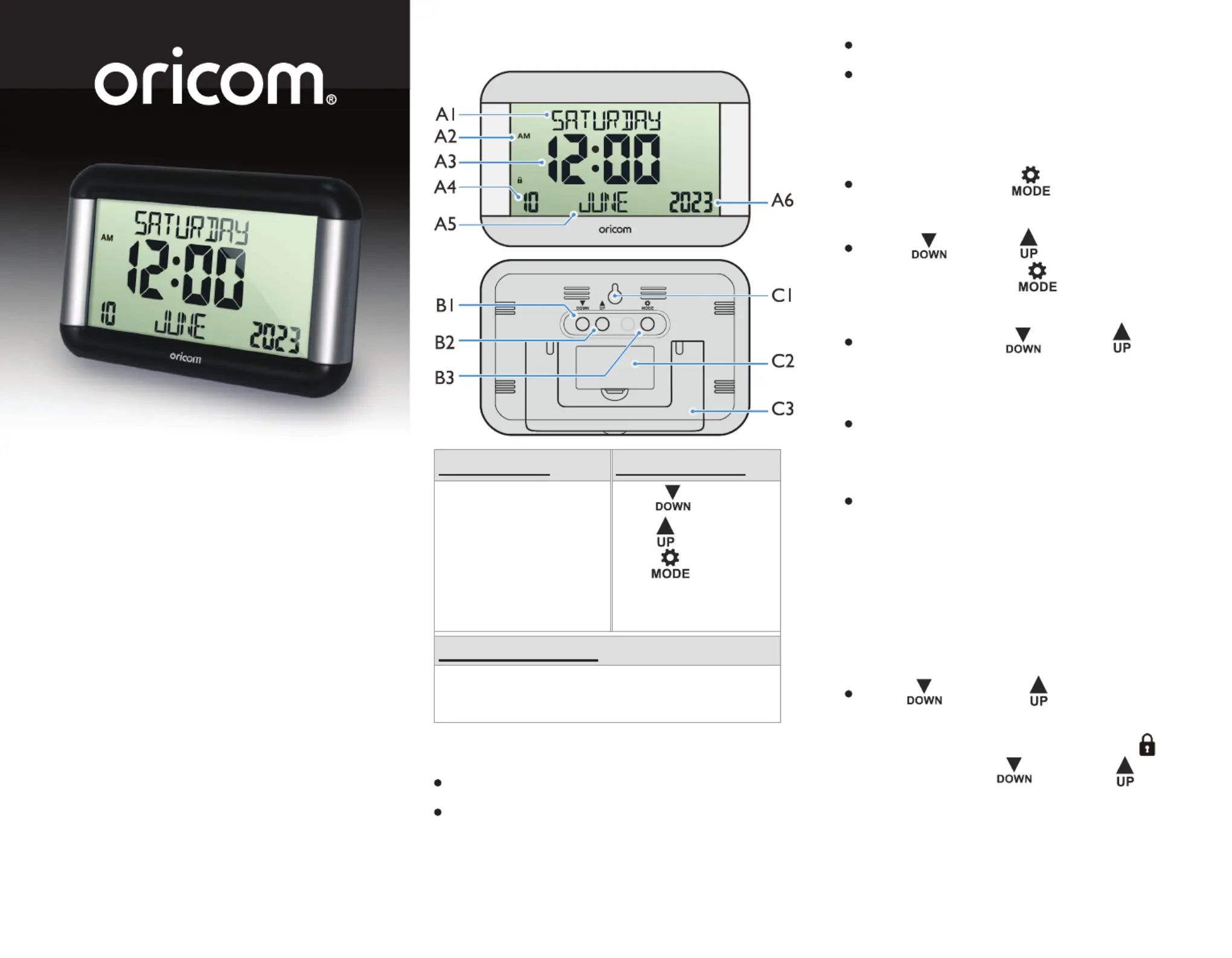
Unit Appearance
Part A‐LCDPart B‐Button
A1:Day of the Week
A2:AM/PM
A3:Time
A4:Date
A5:Month
A6:Year
B1:“
”Button
B2:“
”Button
B3:“
” Button
Part C‐Structure
C1:Hanging HoleStandC3:
C2:Battery Door
Getting started:
Open the battery Cover (C2).
Insert 2 x AA size alkaline batteries observing
polarity [“+” and “–” marks].
3
Replace the battery compartment cover.
Place the unit onto at surface; the unit is ready
for use now.
Time Setting
In time display, hold “ ” button (B4) for 3
seconds to enter Clock/Calendar setting Mode.
Press “ ” (B1) or “ ” (B2) button to adjust
the setting and press “ ” button (B4) to
conrm each setting.
(Press and hold the “ ” (B1) or “ ” (B2)
button to accelerate value scrolling to reach
the desired value quickly.)
The setting sequence is shown as follows:
Language, 12/24 Hr, Hour, Minute, Year, Month,
Day.
There are 8 languages, English, French, German,
Italian, Spanish, Dutch, Swedish, Polish.
Note:
Settings mode will exit automatically after
approximately 15 seconds of inactivity.
Lock buttons
Hold “ ” (B1) and “ ” (B2) buttons at the
same time for 5 seconds to lock buttons.
When the lock feature is activated icon “ ”
is displayed. Hold “ ” (B1) and “ ” (B2)
buttons for 5 seconds to unlock.
‐Large easy to read LED screen
‐Requires 2 AA Batteries (not included)
‐12/24 Hour clock display options
Produktspecifikationer
| Varumärke: | Oricom |
| Kategori: | Inte kategoriserad |
| Modell: | VISO8 |
Behöver du hjälp?
Om du behöver hjälp med Oricom VISO8 ställ en fråga nedan och andra användare kommer att svara dig
Inte kategoriserad Oricom Manualer

11 Februari 2025
11 Februari 2025
10 December 2024
8 September 2024
6 September 2024
5 September 2024
2 September 2024
1 September 2024
1 September 2024
31 Augusti 2024
Inte kategoriserad Manualer
Nyaste Inte kategoriserad Manualer
9 April 2025
9 April 2025
9 April 2025
9 April 2025
9 April 2025
9 April 2025
9 April 2025
9 April 2025
9 April 2025
9 April 2025