Proclip 216410 Bruksanvisning
Proclip Vagga/dockningsstation 216410
Läs gratis den bruksanvisning för Proclip 216410 (2 sidor) i kategorin Vagga/dockningsstation. Guiden har ansetts hjälpsam av 37 personer och har ett genomsnittsbetyg på 4.4 stjärnor baserat på 6 recensioner. Har du en fråga om Proclip 216410 eller vill du ställa frågor till andra användare av produkten? Ställ en fråga
Sida 1/2
Item No. 216410 - ModTek USB-C 3.1 Dock
View Color
Instructions
Compatible with:
ProClip ModTek Hard Cases for
Android and Windows Devices
Compatible Power Supplies:
216406 - Hard-Wired Power Supply
945031 - Cigarette Lighter Adapter (Cig Plug)
945032 - AC Wall Power Supply Dual USB Ports
Important:
Self-installation instructions and advice are provided for your
convenience. It is your responsibility to determine if you have the
knowledge, skills, and physical ability required to properly perform an
installation. ProClip USA, LLC. shall have no liability for damage or
injury resulting from the installation or use of any ProClip or third
party products. It is your responsibility to ensure that all products are
installed in adherence with local laws and regulations and in such a
manner as to allow a vehicle to be operated safely and without
distraction. ProClip USA, LLC. product warranties do not cover the
installation, removal or reinstallation of any product.
Attention: Carefully read all instructions and review the images before installing this product.
Notice: It is important that the user of this product also receive this User Guide. This will give the user guidance
on how to use this product. Please leave the User Guide with the product after installation.
Warning: Docking a tablet in a ModTek Hard Case does not require signicant force. If the hard case does not
line up correctly, it is dicult to dock the tablet onto the USB-C connector. Do NOT force the tablet onto the
connector, simply remove the hard case and verify the alignment before docking again. Damage due to incorrect
docking is not covered by warranty.
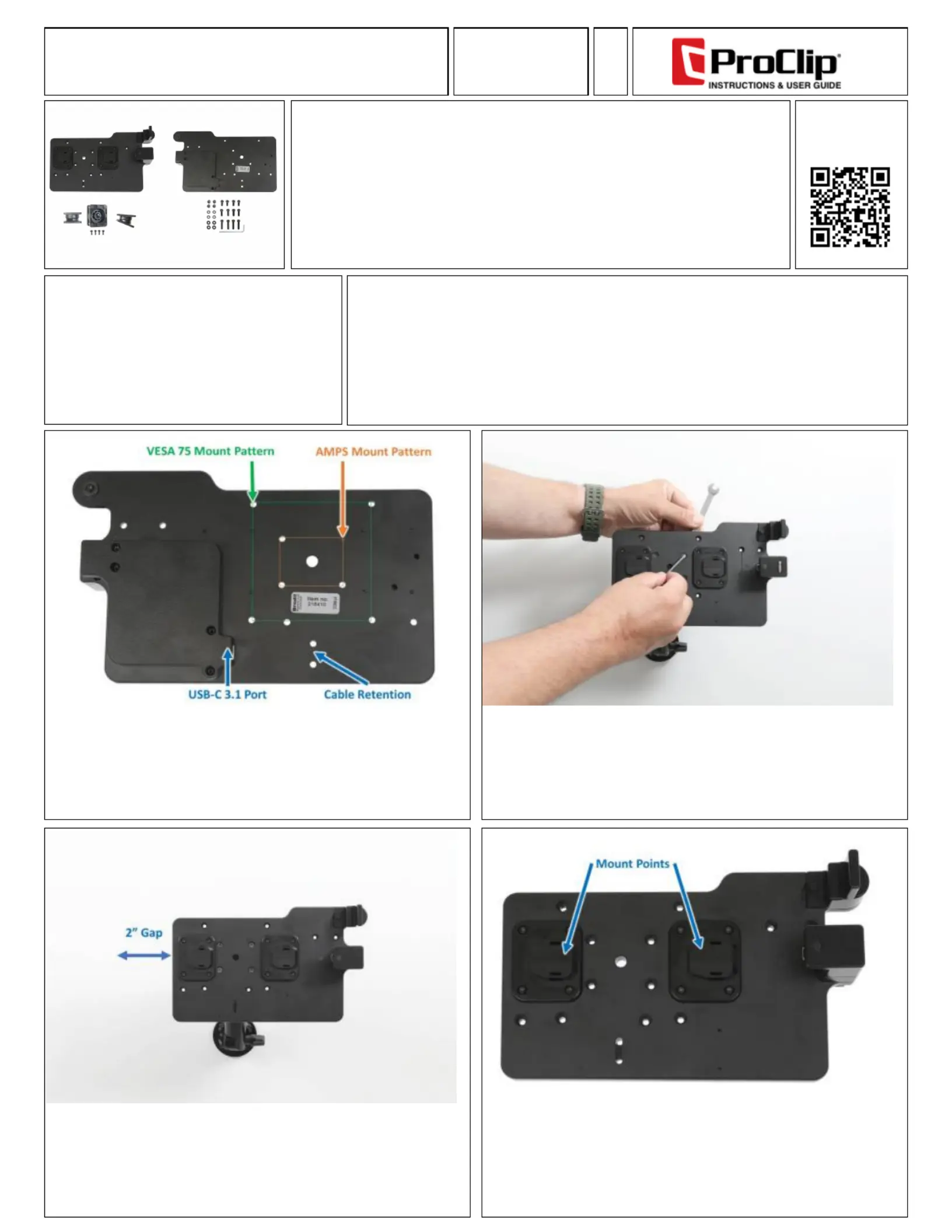
1. Pedestal and Mount Compatibly:
This dock supports the AMPS and VESA75 mount hole patterns to attach of
vehicle and desktop mounts.
The back of the dock is where a USB-C 3.1 cable can be plugged in to provide
power and data to the tablet. The cable retention holes are for the included zip
tie to keep the cable in place.
An optional Tilt-Swivel is included with fasteners to enable the dock to attach to
a at surface and tilt up to 15 degrees.
3. Accessing the Dock:
Once the dock is installed it is important to leave approximately 2 inches
(50mm) of a gap to allow a ModTek Hard Case to be properly aligned and
docked.
2. Mounting the Dock:
Using the included M4 fastener pack, attach the ModTek Dock to your selected
mount. The example here shows a ProClip Heavy Duty Pedestal that is not included
with this product.
The included 3 lengths of M4 fastener pack can be used to attach the dock to a variety
of vehicle and desktop mounts. (#100223 Fastener Pack Included)
4. Mount Points:
This ModTek USB-C 3.1 Dock supports a variety of devices when installed in the
ProClip ModTek Hard Case. The two mount points are used to align the tablet with
the USB-C connector to ensure a perfect alignment and ensure the USB-C connection
to the tablet does not create excessive wear.
Produktspecifikationer
| Varumärke: | Proclip |
| Kategori: | Vagga/dockningsstation |
| Modell: | 216410 |
| Dataöverföringshastighet: | 5 Gbit/s |
| Produktens färg: | Svart |
| VESA-fäste: | Ja |
| USB C-typ, antal portar: | 1 |
| Monteringsgränssnitt kompatibilitet (max): | 75 x 75 mm |
| Dockningskontakttyp: | USB Type-C |
| Grundläggande enhetstyp: | Surfplatta |
Behöver du hjälp?
Om du behöver hjälp med Proclip 216410 ställ en fråga nedan och andra användare kommer att svara dig
Vagga/dockningsstation Proclip Manualer

17 September 2024
Vagga/dockningsstation Manualer
Nyaste Vagga/dockningsstation Manualer
5 April 2025
31 Mars 2025
26 Mars 2025
12 Mars 2025
12 Mars 2025
10 Mars 2025
27 Februari 2025
27 Februari 2025
16 Februari 2025
11 Februari 2025