StarTech.com QUAD-M2-PCIE-CARD-B Bruksanvisning
StarTech.com Inte kategoriserad QUAD-M2-PCIE-CARD-B
Läs gratis den bruksanvisning för StarTech.com QUAD-M2-PCIE-CARD-B (2 sidor) i kategorin Inte kategoriserad. Guiden har ansetts hjälpsam av 30 personer och har ett genomsnittsbetyg på 4.6 stjärnor baserat på 6 recensioner. Har du en fråga om StarTech.com QUAD-M2-PCIE-CARD-B eller vill du ställa frågor till andra användare av produkten? Ställ en fråga
Sida 1/2
Quick-Start Guide
To view manuals, FAQs, videos, drivers, downloads, technical drawings, and more, visit www.startech.com/support.
Manual Revision: June 1, 2022 3:39 PM
Product ID
QUAD-M2-PCIE-CARD-B
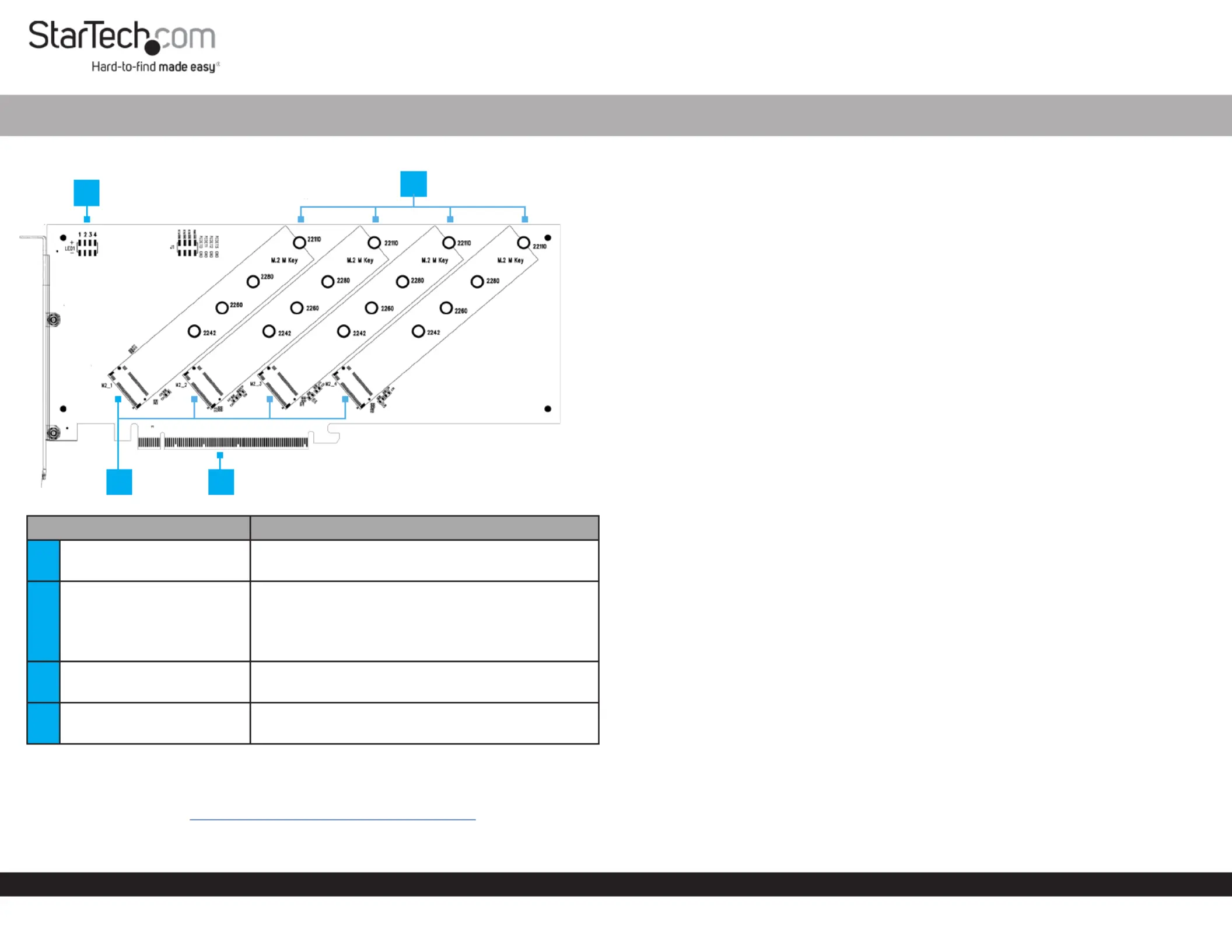
ComponentFunction
1LED Jumper Pins
• Connect to the LED Lights PCIe to M.2 Adapter
Card Drive to showactivity
2
Standos (x 4),
Stando Installation
Screws (x 4), and Drive
Mounting Screws (x 4)
• Secure to theM.2 Storage Devices PCIe to M.2
Adapter Card
• Compatible (NVMe and AHCI): PCIe M.2 SSDs
2242, 2260, 2280, and 22110 drives
3M.2 Connectors
• Connect to the M Keyed M.2 Storage Devices
PCIe to M.2 Adapter Card
4PCIe x16 Connector
• Connect the to the PCIe to M.2 Adapter Card
PCIe SlotComputer in a
Product Information
For the latest manuals, product information, technical specications, and declarations of
conformance, please visit: www.StarTech.com/QUAD-M2-PCIE-CARD-B
PCI Express x16 to Quad M.2 PCIe SSD Adapter with Bifurcation
Package Contents
• PCIe to M.2 Adapter Card x 1
• Quick-Start Guide x 1
• Set of Mounting Screws x 1
Requirements
• Computer x 1
• PCIe x16 Slot with Bifurcation Support
• Phillips Head Screwdriver x 1
• PCI Express M.2 SSD x 4
• Pliers x 1
Installation
WarningPCIe CardsInstaller: can be damaged by static electricity. Ensure that the
is properly grounded before they open the or touch the Computer CasePCIe to M.2
Adapter CardInstallerAnti-Static Strap. The should wear an when installing any
computer component. If an is not available, discharge any built-up Anti-Static Strap
static electricity by touching a large for several seconds. Grounded Metal Surface
Only handle the by its edges and do not touch the gold PCIe to M.2 Adapter Card
connectors.
Note: Computer/MotherboardConsult the documentation that came with the for
details regarding how to enable and congure PCIe Bifurcation.
Install the M.2 Storage Drives
1. Place the next to the and note the that DriveAdapterDrive Installation Holes
match the length of the . If the and are already DriveStandos Installation Screws
installed in the correct position, proceed to step 5.
2. On the front of the use to hold the in place while M.2 Adapter Card,PliersStando
using a to remove the located on the back of the Phillips Head ScrewdriverScrew,
Adapter.
3. Use the to remove the on the front of the Phillips Head ScrewdriverScrewM.2
Adapter Card.
4. Remove the .Stando
5. Repeat steps 2 - 3 to remove the remaining and StandosStando Installation
Screws as needed.
6. Install the in the that matches the length of the StandoDrive Installation Hole
Drive.
7. Gently slide the into the corresponding M.2 Drive Connector M.2 Connector,
locatedon the and press the down toward the adapter M.2 Adapter Card,Drive
until the is properly seatedDrive
Note:M.2 ConnectorDrive M Keyed M Keyed M.2 The on the isso that it only ts
Storage Devices
8. Replace the , removed in step 2, and tighten using a Stando Installation Screw
Philips Head Screwdriver.
3
2
4
1
Produktspecifikationer
| Varumärke: | StarTech.com |
| Kategori: | Inte kategoriserad |
| Modell: | QUAD-M2-PCIE-CARD-B |
Behöver du hjälp?
Om du behöver hjälp med StarTech.com QUAD-M2-PCIE-CARD-B ställ en fråga nedan och andra användare kommer att svara dig
Inte kategoriserad StarTech.com Manualer

18 Mars 2025
18 Mars 2025
3 Januari 2025
2 Januari 2025
2 Januari 2025
2 Januari 2025
2 Januari 2025
2 Januari 2025
2 Januari 2025
2 Januari 2025
Inte kategoriserad Manualer
Nyaste Inte kategoriserad Manualer
9 April 2025
9 April 2025
9 April 2025
9 April 2025
9 April 2025
9 April 2025
9 April 2025
9 April 2025
9 April 2025
9 April 2025