StarTech.com SU2DUPERA11 Bruksanvisning
StarTech.com Inte kategoriserad SU2DUPERA11
Läs gratis den bruksanvisning för StarTech.com SU2DUPERA11 (2 sidor) i kategorin Inte kategoriserad. Guiden har ansetts hjälpsam av 12 personer och har ett genomsnittsbetyg på 4.8 stjärnor baserat på 9 recensioner. Har du en fråga om StarTech.com SU2DUPERA11 eller vill du ställa frågor till andra användare av produkten? Ställ en fråga
Sida 1/2
Quick-start guide
Manual Revision: 08/16/2024
For the latest information, technical specications, and support for
this product, please visit www.StarTech.com/SU2DUPERA11.
Package contents
• 1 x SATA/USB duplicator and eraser
• 1 x universal power adapter (NA/JP, UK, EU, AU)
• 2 x drive-connector cables
• 2 x drive pads
• 1 x quick-start guide
System requirements are subject to change. For the latest
requirements, please visit www.StarTech.com/SU2DUPERA11.
SU2DUPERA11
Standalone Drive Duplicator and Eraser for USB Flash Drives and 2.5”/3.5” SATA SSDs /HDDs
*actual product may vary from photos
Important: Read and understand the entire manual before
you use this product, and follow the instructions as they are
outlined in the manual.
Failure to do so might result in property damage or device
failure.
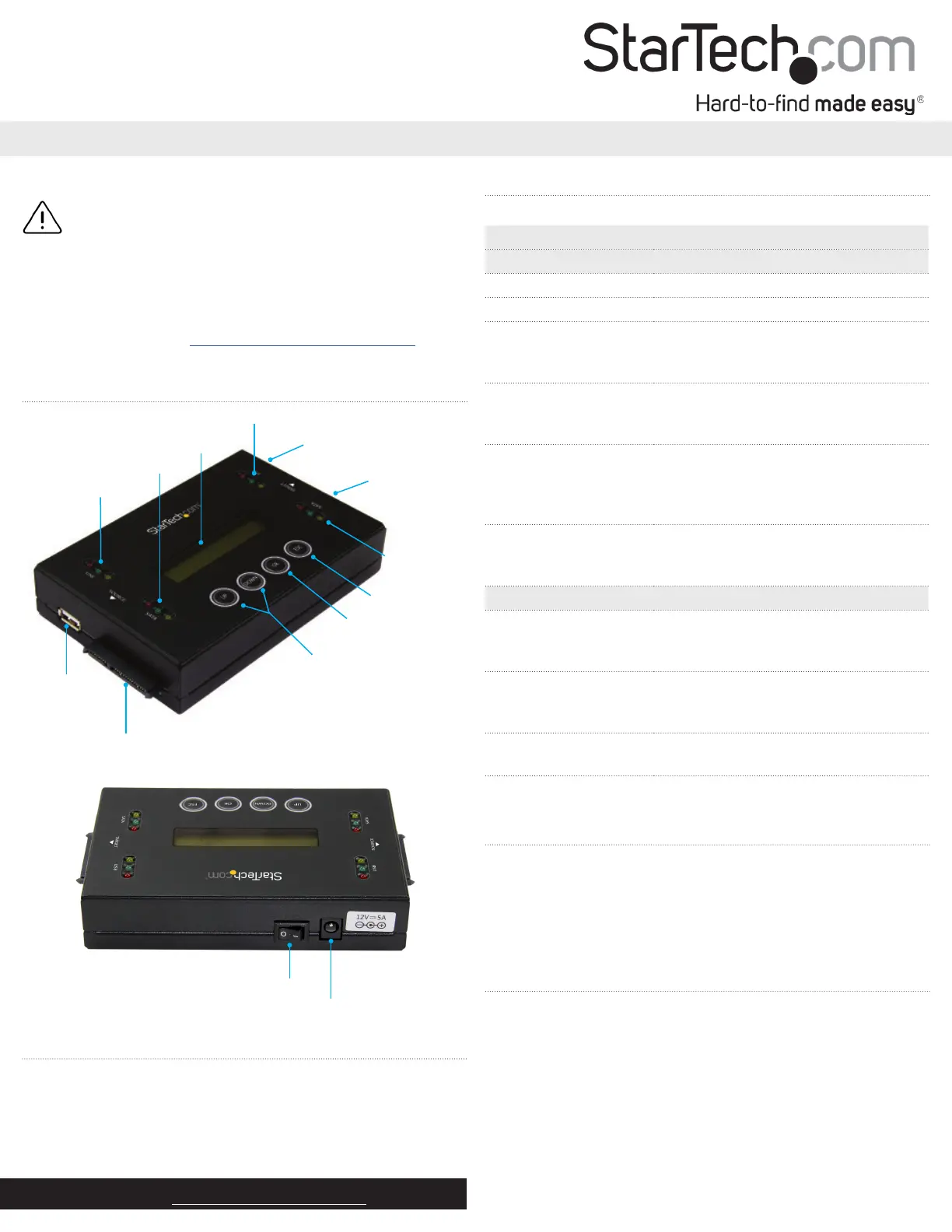
Product diagram
USB source
port
SATA source port
LCD display
Menu navigation
buttons
OK button
Exit button
USB source LEDs
SATA source LEDs
USB target port
SATA target
port
USB target LEDs
SATA
target LEDs
Power switch
Power jack
Erase and copy modes
The SU2DUPERA11 supports ve erase modes and four copy modes.
ModeDenition
Erase modes
Quick eraseThe partition table is quickly erased.
Full eraseThe entire drive is erased.
DoD 5220.22-M eraseA three-pass overwrite based on
DoD 5220.22-M specications
is completed.
DoD 5220.22-M erase
and compare
A three-pass overwrite based on
DoD 5220.22-M specications
is completed and compared.
Secure eraseThe ATA Secure Erase feature of the
drive is executed.
Note: The Secure Erase feature isn’t
supported on USB drives.
Cryptographic EraseLeverages the drive’s built-in encryption
capabilities to securely erase data by
deleting the encryption key.
Copy modes
Copy system and lesOnly the data area of the source drive is
copied and the empty space
isn’t copied.
Copy all partitionsAll of the partitions and data, including
blank partitions, are copied. Blank space
and nonpartition space isn’t copied.
Copy the whole driveThe entire drive is copied, including
empty space.
Copy a percentageA specied percentage range of the
drive is copied.
About copying drives
You can use the SU2DUPERA11 to copy SATA drives in any of the
following congurations:
• SATA drive to SATA drive
• SATA drive to USB drive
• USB drive to USB drive
• USB drive to SATA drive
Copy a SATA or USB drive
Note: You should avoid plugging SATA drives directly into the
SU2DUPERA11, as it puts undue strain on the device connectors. Use
the drive-connector cables instead.
Warning! Make sure that the storage capacity of the target drive
is larger than or equal to the storage capacity of the source drive.
Otherwise, you will get an error when you try to copy your drive.
Warning! After you begin copying a drive, don’t disconnect either
drive or interrupt the process before it has nished. Doing so might
result in damage to the drive or lost data.
Produktspecifikationer
| Varumärke: | StarTech.com |
| Kategori: | Inte kategoriserad |
| Modell: | SU2DUPERA11 |
| Produkttyp: | HDD-duplikator |
| Vikt: | 462 g |
| Höjd: | 100 mm |
| Förpackningens bredd: | 185 mm |
| LED-indikatorer: | Activity, Power |
| Certifiering: | CE, FCC |
| Uteffekt: | 5 A |
| Överföringshastighet: | 6.6 GB/min |
| Produktens färg: | Svart |
| bruksanvisning: | Ja |
| Låddjup: | 265 mm |
| Vikt inkl. förpackning: | 1900 g |
| Ytterförpackningens höjd: | 290 mm |
| Produkter per ytterförpackning: | 8 styck |
| Ytterförpackningens längd: | 470 mm |
| Ytterförpackningens bredd: | 395 mm |
| Typ av strömkontakt: | Typ M |
| Strömförbrukning (vanlig): | 60 W |
| Produktstorlek (BxDxH): | 90 x 135 x 29 mm |
| Temperatur vid drift: | 5 - 45 ° C |
| Temperaturintervall (förvaring): | -20 - 85 ° C |
| Intervall för relativ operativ luftfuktighet: | 5 - 95 % |
| Hållbarhetscertifiering: | RoHS |
| Utgångsspänning: | 12 V |
| AC-inspänning: | 100-240 V |
| Material, hölje: | Stål |
| AC-adapter inkluderad: | Ja |
| Displaytyp: | LCD |
| Portmultiplikator: | Nej |
| Ingående ström: | 1.4 A |
| Kretsar: | Xlinx - Spartan-6 |
| Antal fläktar: | 0 fläkt/-ar |
| HDD-gränssnitt som stöds: | Serial ATA, Serial ATA II, Serial ATA III |
| Typer av nätkontakter som ingår: | AU, EU, NA, UK |
| Antalet samtidiga kopior: | 2 kopior |
| Hårddiskstorlek som stöds: | 2.5, 3.5 " |
| Dupliceringsapparatens driftlägen: | Copy, Erase |
| Antal skydd som ingår: | 2 |
Behöver du hjälp?
Om du behöver hjälp med StarTech.com SU2DUPERA11 ställ en fråga nedan och andra användare kommer att svara dig
Inte kategoriserad StarTech.com Manualer

18 Mars 2025
18 Mars 2025
3 Januari 2025
2 Januari 2025
2 Januari 2025
2 Januari 2025
2 Januari 2025
2 Januari 2025
2 Januari 2025
2 Januari 2025
Inte kategoriserad Manualer
Nyaste Inte kategoriserad Manualer
9 April 2025
9 April 2025
9 April 2025
9 April 2025
9 April 2025
9 April 2025
9 April 2025
9 April 2025
9 April 2025
9 April 2025