StarTech.com USB2004EXT100 Bruksanvisning
StarTech.com Inte kategoriserad USB2004EXT100
Läs gratis den bruksanvisning för StarTech.com USB2004EXT100 (2 sidor) i kategorin Inte kategoriserad. Guiden har ansetts hjälpsam av 25 personer och har ett genomsnittsbetyg på 4.6 stjärnor baserat på 9 recensioner. Har du en fråga om StarTech.com USB2004EXT100 eller vill du ställa frågor till andra användare av produkten? Ställ en fråga
Sida 1/2
Quick-Start Guide
To view manuals, FAQs, videos, drivers, downloads, technical drawings, and more, visit www.startech.com/support.
Manual Revision: June 1, 2021 9:14 AM
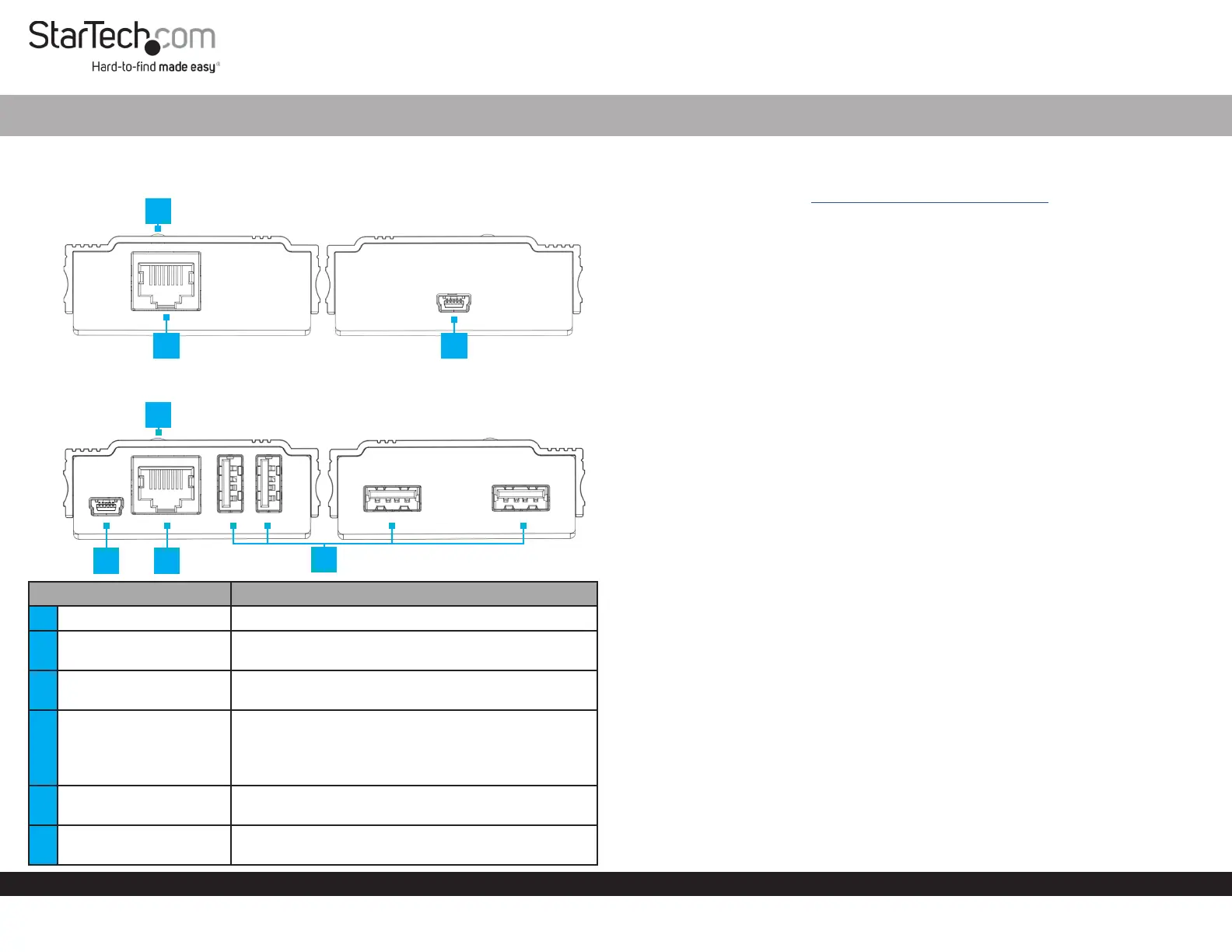
Product Diagram (USB2004EXT100)
Local Transmitter
Remote Receiver
ComponentFunction
1Status LED (Local)• Green: The Local Transmitter is receiving power
2
RJ45 Link Port (Local/
Remote)
• Connect a Cat5e Cable (or better) between the
Local Transmitter and Remote Receiver
3USB Mini-B Host Port
• Connect the Local Extender to the Host Computer
using a USB-A to USB Mini-B Cable
4Status LED (Remote)
• Red: The RemoteReceiver is receiving power but
not linked to the Local Transmitter
• Blue: The RemoteReceiver is receiving power and
linked to the Local Transmitter
5USB Mini-B Power Port
• Connect the Remote Receiver to the USB Power
Adapter using a USB-A to USB Mini-B Cable
6USB-A Port
• Connect USB Peripheral Devices to the Remote
Receiver
4 Port 100m USB 2.0 Extender over CAT5e
Product Information
For the latest product information, technical specications, manuals, and Declarations
of Conformance please visit: www.StarTech.com/USB2004EXT100
Package Contents
• Local Transmitter x 1
• Remote Receiver x 1
• USB-A to USB Mini-B Cables x 2
• CAT5e Cable x 1
• Universal Power Adapter (NA/JP, EU, UK, ANZ) x 1
• Rubber Feet x 8
• Quick-Start Guide x 1
Installation
1. Position the Local Transmitter near the Host Computer.
2. Position the Remote Receiver near an AC Electrical Outlet.
3. Connect a Cat5e Cable (or better) to the RJ45 Link Port on the Local Transmitter
and the other end to the RJ45 Link Port on the Remote Receiver.
Note: The Cat5e Cabling cannot go through any networking equipment (router,
switch, etc.).
4. Connect USB Devices to the USB-A Ports on the Remote Receiver.
5. Plug the Universal Power Adapter into the AC Electrical Outlet
6. Connect the Universal Power Adapter to the USB Mini-B Power Port on the
Remote Receiver using a USB-A to USB Mini-B Cable.
7. Connect the Host Computer to the USB Mini-B Host Port on the Local Transmitter
using a USB-A to USB Mini-B Cable.
23
1
5
6
4
2
Produktspecifikationer
| Varumärke: | StarTech.com |
| Kategori: | Inte kategoriserad |
| Modell: | USB2004EXT100 |
| Vikt: | 143 g |
| Bredd: | 60 mm |
| Djup: | 100 mm |
| Höjd: | 65 mm |
| Förpackningens bredd: | 235 mm |
| LED-indikatorer: | Status |
| Snabbstartsguide: | Ja |
| Modell: | Konsol-sändare och -mottagare |
| Uteffekt: | 2 A |
| Antal RJ-45-portar: | 2 |
| Spänning: | 100 - 240 V |
| Kabeltyper som stöds: | Cat5e, Cat6 |
| Produktens färg: | Svart |
| Låddjup: | 153 mm |
| Vikt inkl. förpackning: | 716 g |
| Ytterförpackningens höjd: | 275 mm |
| Produkter per ytterförpackning: | 12 styck |
| Ytterförpackningens längd: | 323 mm |
| Ytterförpackningens bredd: | 410 mm |
| Strömförbrukning (vanlig): | 10 W |
| Temperatur vid drift: | 0 - 40 ° C |
| Temperaturintervall (förvaring): | -10 - 60 ° C |
| Intervall för relativ operativ luftfuktighet: | 0 - 80 % |
| Hållbarhetscertifiering: | CE, RoHS |
| Utgångsspänning: | 5 V |
| Material, hölje: | Aluminium |
| Kabel inkluderad: | LAN (RJ-45), USB |
| AC-adapter inkluderad: | Ja |
| Harmonized System (HS)-kod: | 84733020 |
| Faktisk dataöverföringshastighet: | 480 Mbit/s |
| Maximal överföringshastighet avstånd: | 100 m |
| Fötter i gummi: | Ja |
| Mini-USB 2.0 anslutningar: | 2 |
| Antal USB 2.0 typ A-portar: | 4 |
Behöver du hjälp?
Om du behöver hjälp med StarTech.com USB2004EXT100 ställ en fråga nedan och andra användare kommer att svara dig
Inte kategoriserad StarTech.com Manualer

18 Mars 2025
18 Mars 2025
3 Januari 2025
2 Januari 2025
2 Januari 2025
2 Januari 2025
2 Januari 2025
2 Januari 2025
2 Januari 2025
2 Januari 2025
Inte kategoriserad Manualer
Nyaste Inte kategoriserad Manualer
9 April 2025
9 April 2025
9 April 2025
9 April 2025
9 April 2025
9 April 2025
9 April 2025
9 April 2025
9 April 2025
9 April 2025